A free Visual Studio Code extension for Yarn Spinner.
The Yarn Spinner extension adds support for the Yarn Spinner dialogue language to Visual Studio Code. It gives you syntax highlighting and error checking while you write, a graph view of how your nodes connect, and a preview that runs your dialogue inside the editor. It is free, and runs on Windows, macOS, and Linux.
What is the Yarn Spinner editor?
The Yarn Spinner editor is a free extension for Visual Studio Code that adds support for the Yarn Spinner dialogue language. It is the same tool the Yarn Spinner team uses to write and maintain dialogue, and is built for the narrative designers, writers, and developers who work in Yarn every day.
Syntax Highlighting
Light and dark themes for Yarn scripts that colour lines, commands, options, and variables so a script is easier to read.
Autocomplete and Hover Help
Suggestions for node names, variables, commands, and functions as you type, with documentation on hover and a preview of the node you are about to jump to.
Error Checking
Type mismatches, missing nodes, and syntax errors are reported as you write, with quick fixes and "did you mean" suggestions for likely typos.
Go to Definition and References
Jump to where a node is defined, find every reference to it, and see reference counts inline, across projects with hundreds of files.
Spell Checking
Spell checking that understands Yarn syntax, so it checks the text players will read and ignores commands and variables. Character names and made-up words can be added to a custom dictionary.
Character Portraits
Each speaking character's portrait or initials can be shown next to their lines in the editor gutter, with colours to tell characters apart in a busy script.
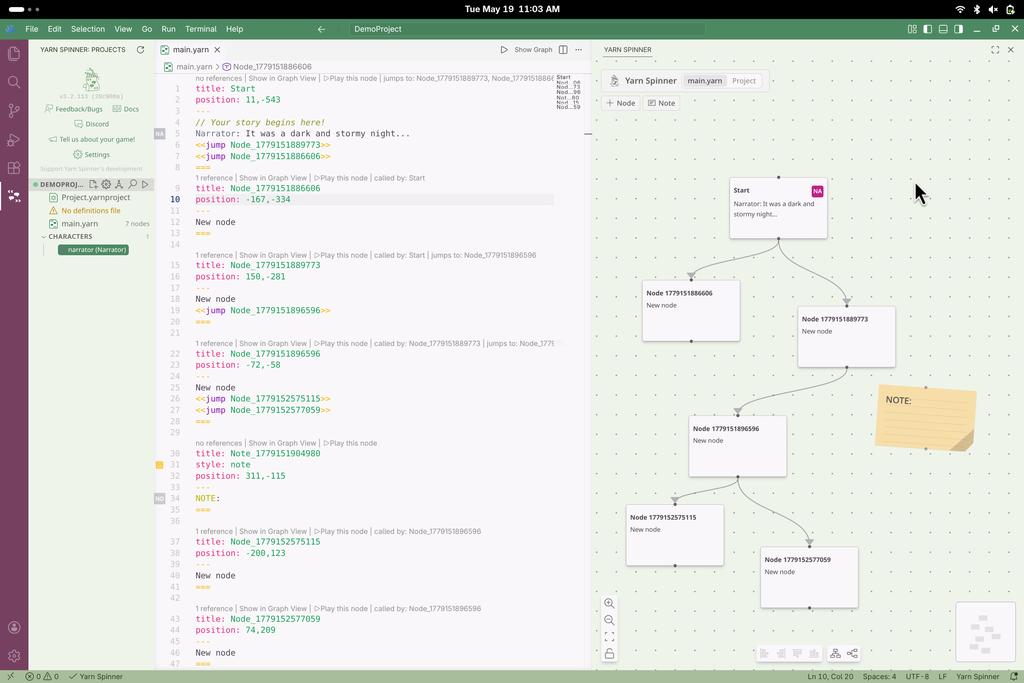
The graph view shows your nodes and the connections between them. It updates as you write, you can drag nodes into the arrangement you want, and you can view a single file or your whole project.
File and Project Graphs
View the nodes in the file you are editing, or switch to a project-wide graph that shows every file and the connections between them.
Arranging Nodes
Move nodes by hand, select and move several at once, or use auto-layout to arrange them vertically or horizontally.
Colours, Clusters, and Notes
Give nodes colours, group related nodes into clusters, and add sticky-note nodes to annotate the graph without affecting playback.
Node Previews
Each node card can show the first few lines of its dialogue, so you can read the content from the graph rather than opening every node.
The preview runs your dialogue with the real Yarn Spinner runtime, so you can step through options and try different paths without building your game first.
In-Editor Preview
Play through any node inside the editor, choose options, and restart at any point. You can also change the saliency strategy to see how content selection behaves.
HTML Export
Export a self-contained, interactive HTML file of your dialogue so writers and other people on the project can play through it without an engine.
Project Editor
Edit your .yarnproject with a form instead of by hand: choose which files to include, define characters and colours, and manage projects from a sidebar.
Templates
Create a new project from a template that includes sample dialogue and characters, which is a useful starting point if you are learning Yarn Spinner.
Localisation
Manage string tables, the base language, and asset directories so the project is set up for translation.
Custom Commands and Functions
Define your game's own commands and functions in definition files, or have the extension find them in your C# source, so they get autocomplete and type checking.
Export Formats
Export dialogue as a recording spreadsheet (Excel or CSV) for a voice team, as Markdown for review, or as a graph in DOT and Mermaid formats.
Works with Any Engine
The dialogue you write runs anywhere Yarn Spinner runs: Unity, Godot (C# and GDScript), and Unreal Engine.
The Yarn Spinner extension is free and open source. To install it, open the Extensions view in Visual Studio Code, search for Yarn Spinner, and click Install. You can also install it from the Marketplace.
Get started
Install the verified Yarn Spinner extension, then follow the guide to set up your first project.