
Node Groups
You can also create node groups. A node group is collection of nodes that share the same name that Yarn Spinner will choose from.
To create a node group, you create multiple nodes that all share the same name, and ensure that each of the nodes have at least one when: header.
The when:header tells Yarn Spinner about the conditions that must be met to run the node:
title: Guard
when: once
---
Guard: You there, traveller!
Player: Who, me?
Guard: Yes! Stay off the roads after dark!
===
title: Guard
when: always
---
Guard: I hear the king has a new advisor.
===
title: Guard
when: $has_sword
---
Guard: No weapons allowed in the city!
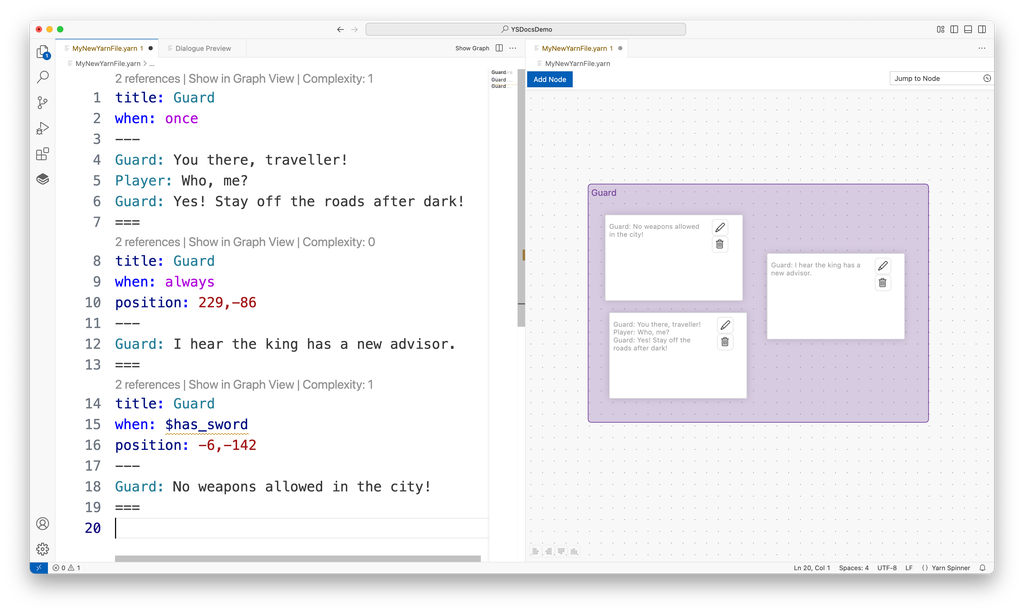
===$has_sword is trueGuard, with three nodes.Node groups are combined into a single node that performs the appropriate checks and then runs one of the node group’s members. You start dialogue with a node group using its name. You can also use the jump or detour statements to run a node group from somewhere else in your Yarn scripts.
Node groups will be visualised in a box of their own in the Graph View of Yarn Spinner for Visual Studio Code:
What can go in a when: header
| Header | The node can run… |
|---|---|
when: always | Any time. |
when: once | Only once. |
when: $has_sword | While the variable is true. |
when: $gold >= 5 | While the comparison is true. |
when: $can_pay | While the smart variable is true. |
when: $weapon == Weapon.Sword | While the enum variable holds that case. |
when: visited("Intro") | After the Intro node has been visited. visited is a built-in function that returns true or false. |
when: visited_count("Shop") > 2 | After the Shop node has been visited more than twice. A function that returns a number can be compared, like any other number. |
when: has_item("sword") | While the game’s has_item function returns true. Functions that your game defines work too, as long as the expression is still true or false. |
when: visited("Intro") and $gold >= 5 | While both conditions are true. |
when: not visited("Castle") or $has_key | Before the Castle node has been visited, or at any time while $has_key is true. |
when: visited("Intro") and visited_count("Shop") >= 3 and dice(6) > 3 | After the Intro node has been visited and the Shop node has been visited at least 3 times, and only when the dice roll is higher than 3. |
when: once if visited("Intro") | Only once, and only after the Intro node has been visited. |
Apart from always, once and once if, a when: header is an expression that must be true or false. It can use variables, smart variables, enums, comparisons and function calls, and it can combine any number of them with the logical operators and, or, xor and not. An expression that results in any other type, like when: 5, is an error.
Commands can’t go in a when: header, because a command doesn’t produce a value. To get information from your game into a when: header, use a function instead.
Using more than one when: header
A node can have as many when: headers as you want, and it can only run if all of them are true. Using two when: headers works the same as using one when: header that joins the two conditions with and. Both of these nodes can only run after the Intro node has been visited, and while $gold is at least 5:
title: Guard
when: visited("Intro")
when: $gold >= 5
---
Guard: Back again? And you can pay this time.
===title: Guard
when: visited("Intro") and $gold >= 5
---
Guard: Back again? And you can pay this time.
===When more than one node in a group can run, Yarn Spinner’s saliency strategy chooses which one runs. You’ll learn more about saliency shortly, in Saliency. The built-in strategies only choose from nodes that haven’t failed any of their conditions, and most of them prefer the node with the highest complexity score. These two nodes both have a complexity score of 2, so the built-in strategies treat them in exactly the same way.
Each when: header has a complexity score, and a node’s score is the total of all of its when: headers:
alwaysscores 0.oncescores 1.- An expression scores 1, plus 1 for each
and,ororxorin it. Other operators, likenotand>=, don’t add anything. once ifscores 1 for theonce, plus the score of its expression.
For example, when: $has_sword scores 1, when: $a or $b scores 2, and when: once if $a and $b scores 3. A node with both when: visited("Intro") and when: $gold >= 5 scores 1 + 1 = 2, the same as one header with visited("Intro") and $gold >= 5.
The Best, Best Least Recently Viewed, and Random Best Least Recently Viewed strategies use the score to prefer nodes with more specific conditions. The First strategy doesn’t use it.
The one difference between the two versions is how many conditions the node has. Each when: header is a separate condition, and a saliency strategy is told how many of a node’s conditions passed and how many failed. If the Intro node has been visited but $gold is less than 5, the node with two headers has one condition that passed and one that failed, but the node with one header has a single condition that failed. The built-in strategies only check whether any condition failed, but a custom saliency strategy can use the counts, for example to tell a node that nearly qualified from one that didn’t come close.
Naming the nodes in a group
Yarn Spinner gives each node in a group its own name, and uses that name to remember things about the node: whether a when: once node has run, how many times the node has been visited, and how many times a saliency strategy has picked it. Your game saves this along with your other variables.
Add a subtitle: header to choose that name yourself:
title: Guard
subtitle: warning
when: once
---
Guard: You there, traveller!
===
title: Guard
subtitle: gossip
when: always
---
Guard: I hear the king has a new advisor.
===These nodes are named Guard.warning and Guard.gossip. Each node in a group needs a different subtitle.
Without a subtitle:, the name is made from the name of the file and the line the node starts on. If you add or remove lines above the node, move it, or rename the file, the name changes and Yarn Spinner forgets what it remembered about the node. A player loading a saved game could then see a when: once node again. Give every node in a group a subtitle: before you ship your game.