
Detours
flowchart TD
  guard["<b>Guard</b><br>Guard: Have I told you my backstory?"]
  backstory["<b>Guard_Backstory</b><br>Guard: It all started when I was a mere recruit."]
  anyway["<b>Guard</b>, after the options<br>Guard: Anyway, you can't come in."]
  guard -->|"-#gt; No?<br>#lt;#lt;detour Guard_Backstory#gt;#gt;"| backstory
  backstory -.->|"End of the node: return to Guard"| anyway
  guard -->|"-#gt; Yes.<br>Guard: Oh. Well, then."| anyway
In addition to using the Jump Command to move between nodes, you can also use a detour command.
A detour command looks similar to jump: it takes a single parameter with the title of the node you want to move to, but unlike the jump command the detour command will return to the node that called it afterwards.
Using the Detour Command
The detour command works much like the jump command, except it will return to the node it detoured from after that node is done. For example:
title: Guard
---
Guard: Have I told you my backstory?

-> Yes.
	Guard: Oh. Well, then.
-> No?
	<<detour Guard_Backstory>>

Guard: Anyway, you can't come in.
===

title: Guard_Backstory
---
Guard: It all started when I was a mere recruit.
// (five minutes of exposition omitted)
===If the player replies No? to the guard’s question, Yarn Spinner will detour to the node titled Guard_Backstory and run its contents.
When the end of the Guard_Backstory node is reached, Yarn Spinner will return to the node titled Guard, and resume from just after the detour statement.
Using Detour with the Return Command
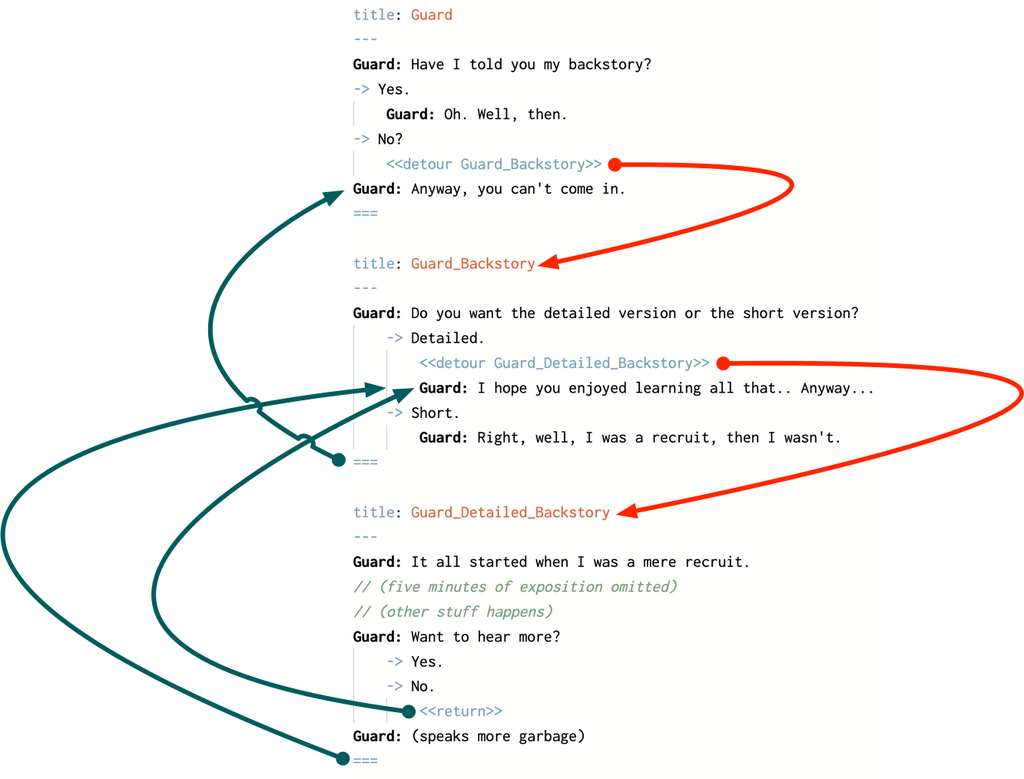
When you detour into a node, Yarn Spinner runs the content from that node as if you’d used a jump statement. When you reach the end of the node, or reach a return command, Yarn Spinner will return to just after the detour command. A return command looks like <<return>>. There are no parameters.
You can return early from a detoured node by using the return command. Doing so will return to just after the detour command as though the end of the node had been reached, for example:
title: Guard
---
Guard: Have I told you my backstory?

-> Yes.
	Guard: Oh. Well, then.
-> No?
	<<detour Guard_Backstory>>

Guard: Anyway, you can't come in.
===

title: Guard_Backstory
---
Guard: Do you want the detailed version or the short version?

-> Detailed.
	<<detour Guard_Detailed_Backstory>>
	Guard: I hope you enjoyed learning all that.. Anyway...
-> Short.
	Guard: Right, well, I was a recruit, then I wasn't.
===

title: Guard_Detailed_Backstory
---
Guard: It all started when I was a mere recruit.

// (five minutes of exposition omitted)
// (other stuff happens)

Guard: Want to hear more?

-> Yes.
-> No.
	<<return>>

Guard: (speaks more garbage)
===<<return>>.return command, and it hasn’t detoured from another node, it will stop the dialogue (that is, it will behave as though you had written a stop command.)When you detour into a node, that node can itself detour into other nodes. If a detoured node uses a jump command to run another node, the return stack is cleared. If you detour into a node, and that node jumps to another node, Yarn Spinner won’t return to your original detour site.
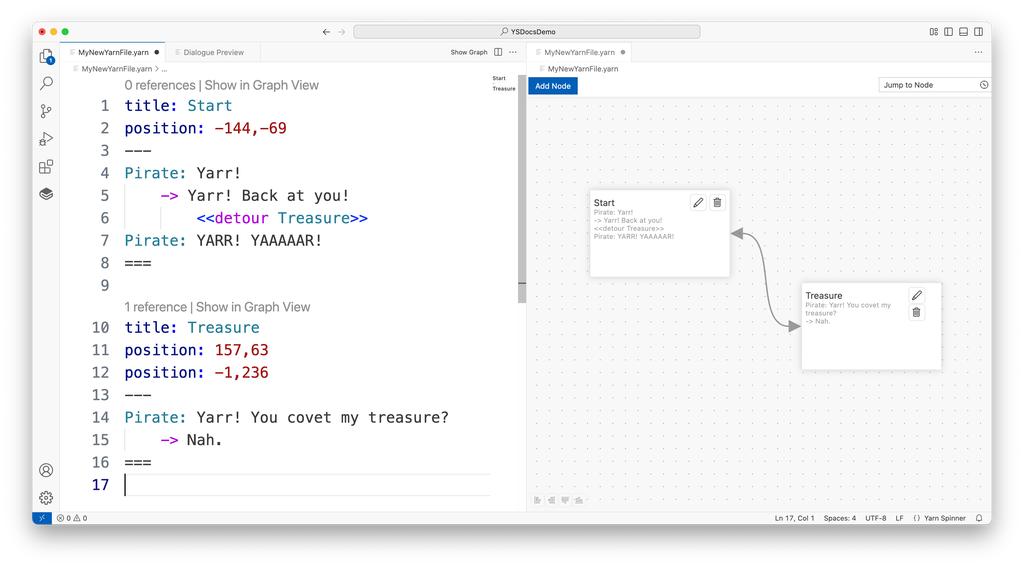
When you use <<detour>> command, they’ll be shown in the Graph View in Yarn Spinner for Visual Studio Code as an line with an arrow at each end, from the node that’s being detoured to the node that’s being detoured to:
Write some Detour Commands
Spread your story out over the nodes in a sensible manner.
<<detour>> command to move between nodes in your storySpecify the name of the node you want to jump to inside each <<detour>> command.
Play through it, and check that the detours behave as you’d expect.
Next up, learn about Variables in Yarn Spinner Scripts.