
Yarn Spinner for VS Code
A powerful extension for writing, previewing, and debugging Yarn scripts in Visual Studio Code.
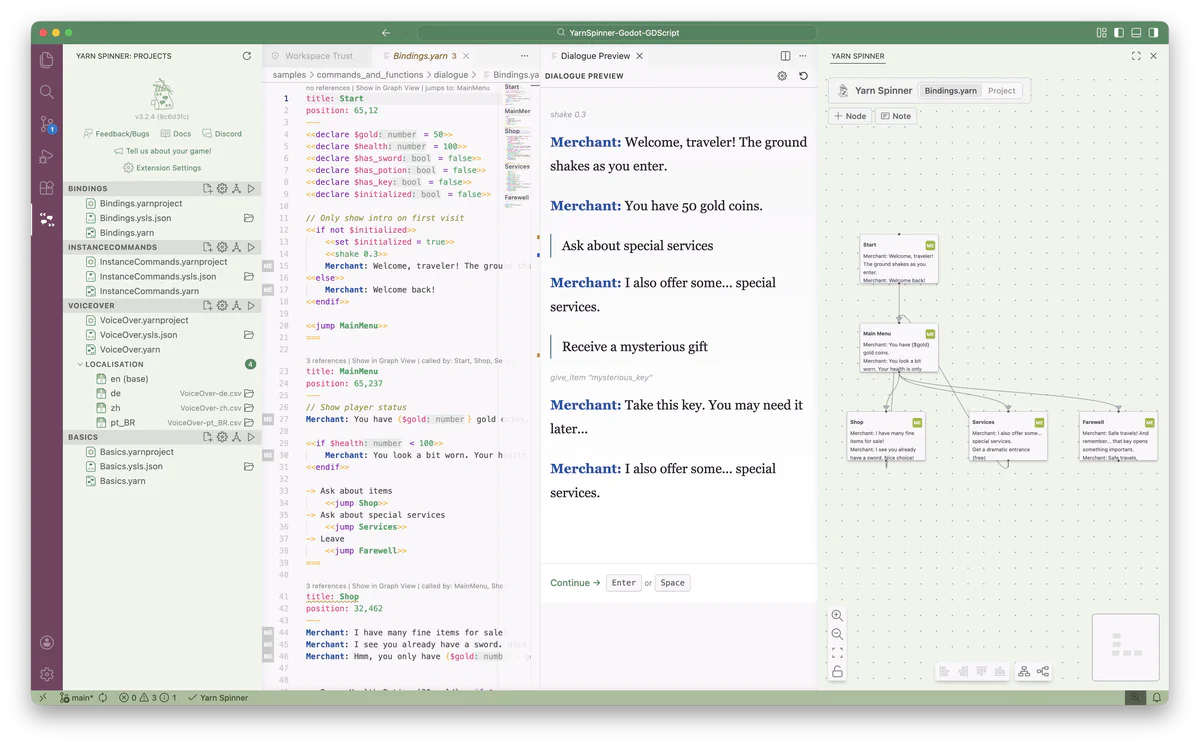
Syntax Highlighting
Keywords, character names, options, commands, and variables are all colour-coded.
Visual Graph View
See every node and connection in an interactive graph. Drag, rearrange, colour-code.
Live Preview
Run your dialogue right inside VS Code. Pick options, watch variables change.
Autocomplete
Suggestions for node names, variables, commands, and functions as you type.
Hover Info & Types
Hover a variable to see its type, default, and description. Catches type errors early.
Jump-to-Node
Cmd-click any node name to jump to its definition. Navigate large scripts effortlessly.
Live Share
Write together in real-time using VS Code Live Share.
Export
Export as standalone HTML, GraphViz diagram, or recording spreadsheet.
Sticky Notes & Colours
Add sticky notes. Colour-code nodes to organise storylines and characters.
Learn more
Writing Yarn in VS Code
Graph view, autocomplete, node navigation, and everything for efficient writing.
Previewing Your Dialogue
Run and test your scripts inside the editor with the built-in preview pane.
Writing Together
Collaborate in real-time with teammates using VS Code Live Share.
Project Files
Configure source patterns, localization, and compiler settings.
Other ways to write Yarn
Try Yarn Spinner
Write and run Yarn scripts right in your browser. No install needed — perfect for learning and quick experiments.
Playground Coming Soon
A new standalone editor for Yarn Spinner. Currently in development.