
A Different Kind of Presenter
The Presenter on Building Your Own Presenter works a lot like the built-in ones. It shows one line at a time, and options as buttons. A Presenter only has to show a line and say when it’s done, and show options and say which one the player picked. How it does those two things is up to you.
The Presenter on this page uses the same two events, but keeps the whole conversation on screen as a transcript, like a text adventure:
- Nothing is cleared. Each line is added under the last, so the player can read back through the whole conversation.
- Options are text, not buttons. They’re listed as numbered lines in the transcript, and stay there after the player has picked.
- The player picks with the number keys. Pressing 1 picks the first option, 2 the second, and so on.
- The choice is written into the transcript. After the player picks, the option they chose appears after a
>.
The widget
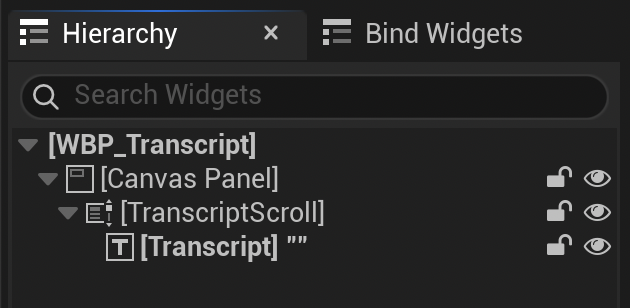
The whole Presenter writes to one Text Block, inside a Scroll Box, so the player can scroll back through the transcript. The Presenter scrolls to the bottom each time it adds to the transcript.
- In the Content Browser, click Add, and choose . Pick User Widget, and name it
WBP_Transcript. - Add a Scroll Box named
TranscriptScroll, and size it to fill the screen. - Inside the Scroll Box, add a Text Block (Text in the Palette) named
Transcript. Clear its text, and turn on Auto Wrap Text, under Wrapping in the Details panel.
The Presenter
The same Presenter can be made as a Blueprint whose parent class is Yarn Dialogue Presenter, named BP_TranscriptPresenter. Give it a String variable called Transcript Text, and an Integer array called Choices.
- Add a function called Append, with a String input called Text. It appends Text to Transcript Text, sets the
TranscriptText Block’s text to Transcript Text, and calls Scroll To End onTranscriptScroll. - On Event On Dialogue Started, if the widget variable isn’t valid yet, Create Widget with
WBP_Transcript, Add to Viewport, and keep it in the variable. - On Event Run Line, break the Line pin, and call Append with its Text followed by two new lines.
- On Event Run Options, clear Choices, then loop over the Options with For Each Loop. For each option whose Is Available is true, add the Array Index to Choices, and call Append with the new length of Choices, a
., and the option’s Line’s Text Without Character Name. - On Event Tick, get Get Player Controller. If Choices is empty, call Request Next Line on Get Dialogue Runner when Is Presenting Line is true and Was Input Key Just Pressed returns true for Space Bar.
- If Choices isn’t empty, and Is Option Next Content Requested is true, clear Choices. Otherwise, loop over an array of the keys One to Nine, made with Make Array. When Was Input Key Just Pressed returns true for the key at position Array Index, and Array Index is less than the length of Choices, pick that option.
- To pick an option, get the option’s index from Choices at that position, and clear Choices. Call Append with
>and the option’s text, taken from Current Options, then call On Option Selected with the index.
Like the simple Presenter, this one reads the keyboard itself, from its tick. Your module needs "YarnSpinner" and "UMG" in its PublicDependencyModuleNames.
#pragma once

#include "CoreMinimal.h"
#include "YarnDialoguePresenter.h"
#include "TranscriptPresenter.generated.h"

class UScrollBox;
class UTextBlock;
class UUserWidget;

UCLASS(ClassGroup = (Custom), meta = (BlueprintSpawnableComponent))
class UTranscriptPresenter : public UYarnDialoguePresenter
{
	GENERATED_BODY()

public:
	UTranscriptPresenter();

	UPROPERTY(EditAnywhere, Category = "Transcript")
	TSubclassOf<UUserWidget> WidgetClass;

	virtual void TickComponent(float DeltaTime, ELevelTick TickType, FActorComponentTickFunction* ThisTickFunction) override;

	virtual void OnDialogueStarted_Implementation() override;
	virtual void RunLine_Implementation(const FYarnLocalizedLine& Line, bool bCanHurry) override;
	virtual void RunOptions_Implementation(const FYarnOptionSet& Options) override;

private:
	UPROPERTY(Transient)
	TObjectPtr<UUserWidget> Widget;

	UPROPERTY(Transient)
	TObjectPtr<UTextBlock> Transcript;

	UPROPERTY(Transient)
	TObjectPtr<UScrollBox> TranscriptScroll;

	FString TranscriptText;
	TArray<int32> Choices;

	void Append(const FString& Text);
	void Pick(int32 Number);
};#include "TranscriptPresenter.h"
#include "Blueprint/UserWidget.h"
#include "Components/ScrollBox.h"
#include "Components/TextBlock.h"
#include "GameFramework/PlayerController.h"
#include "YarnDialogueRunner.h"
UTranscriptPresenter::UTranscriptPresenter()
{
PrimaryComponentTick.bCanEverTick = true;
}
void UTranscriptPresenter::OnDialogueStarted_Implementation()
{
if (Widget)
{
return;
}
Widget = CreateWidget<UUserWidget>(GetWorld()->GetFirstPlayerController(), WidgetClass);
Transcript = Cast<UTextBlock>(Widget->GetWidgetFromName(TEXT("Transcript")));
TranscriptScroll = Cast<UScrollBox>(Widget->GetWidgetFromName(TEXT("TranscriptScroll")));
Widget->AddToViewport();
}
void UTranscriptPresenter::TickComponent(float DeltaTime, ELevelTick TickType, FActorComponentTickFunction* ThisTickFunction)
{
Super::TickComponent(DeltaTime, TickType, ThisTickFunction);
APlayerController* Player = GetWorld()->GetFirstPlayerController();
if (!Player)
{
return;
}
if (Choices.IsEmpty())
{
if (bIsPresentingLine && Player->WasInputKeyJustPressed(EKeys::SpaceBar))
{
GetDialogueRunner()->RequestNextLine();
}
return;
}
if (IsOptionNextContentRequested())
{
Choices.Empty();
return;
}
const FKey NumberKeys[] = { EKeys::One, EKeys::Two, EKeys::Three, EKeys::Four, EKeys::Five, EKeys::Six, EKeys::Seven, EKeys::Eight, EKeys::Nine };
for (int32 Number = 0; Number < Choices.Num() && Number < 9; Number++)
{
if (Player->WasInputKeyJustPressed(NumberKeys[Number]))
{
Pick(Number);
return;
}
}
}
void UTranscriptPresenter::RunLine_Implementation(const FYarnLocalizedLine& Line, bool bCanHurry)
{
Append(Line.Text.ToString() + TEXT("\n\n"));
}
void UTranscriptPresenter::RunOptions_Implementation(const FYarnOptionSet& Options)
{
Choices.Empty();
for (int32 i = 0; i < Options.Options.Num(); i++)
{
if (!Options.Options[i].bIsAvailable)
{
continue;
}
Choices.Add(i);
const FString Text = Options.Options[i].Line.TextWithoutCharacterName.ToString();
Append(FString::Printf(TEXT("%d. %s\n"), Choices.Num(), *Text));
}
}
void UTranscriptPresenter::Pick(int32 Number)
{
const int32 Index = Choices[Number];
Choices.Empty();
const FString Picked = CurrentOptions.Options[Index].Line.TextWithoutCharacterName.ToString();
Append(TEXT("\n> ") + Picked + TEXT("\n\n"));
OnOptionSelected(Index);
}
void UTranscriptPresenter::Append(const FString& Text)
{
TranscriptText += Text;
Transcript->SetText(FText::FromString(TranscriptText));
TranscriptScroll->ScrollToEnd();
}Number in NumberKeys picks the option numbered Number + 1 on screen.Choices[0] is the index of the option numbered 1, and so on. Unavailable options are left out, so the numbers on screen have no gaps.>, and tell the Dialogue Runner its index. Write to the transcript first: the next line can arrive before OnOptionSelected returns.To use it:
- Build your project, and open the Actor that has your Dialogue Runner.
- In the Components panel, click Add, and add a Transcript Presenter.
- Select the Transcript Presenter, and set its Widget Class to
WBP_Transcript. - Select the Dialogue Runner, and add the Transcript Presenter to its Dialogue Presenters list. It handles both lines and options, so it can be the only Presenter.
What stayed the same
Everything this Presenter does differently happens inside Run Line and Run Options. What it gives back to the Dialogue Runner is the same as the simple Presenter:
- The line is finished once the player has moved on. It makes no difference to the Dialogue Runner that the line is still on screen.
- On Option Selected gets the index of the chosen option in the array the Presenter was given. The number the player pressed is only the option’s position on screen, and
Choicesturns it back into that index. - Both stop when the Dialogue Runner says the dialogue is moving on.