
Replacement Markup
This sample uses markup to change a line’s text before the Line Presenter shows it. Some of it is a Markup Palette and a TextMeshPro style, which need no code of their own. The rest is three marker processors written for the sample: one hides part of a line, one colours people’s names, and one adds an icon from a sprite sheet.
When you run it, there are four characters in the arena, and each one shows something different:
| Character | Yarn Script | What it shows |
|---|---|---|
| Anika | BuiltinReplacements.yarn | A Markup Palette with [b], [i], [u], [custom] and [fancy], and a [style=h2] style. |
| Alice | NamedReplacement.yarn | [name], which colours and bolds people’s names. |
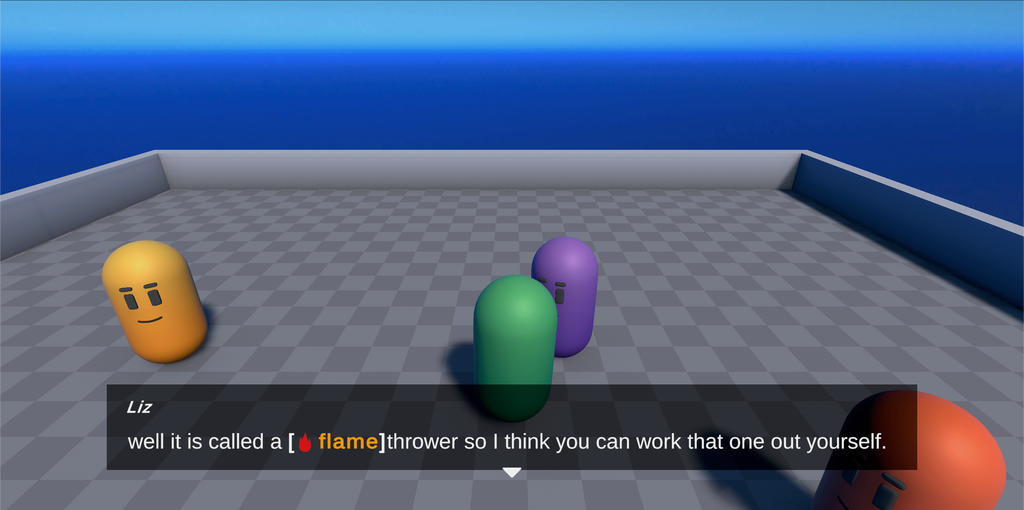
| Liz | SpriteReplacer.yarn | [lightning], [ice], [heart] and [fire], which add an icon and colour the text. |
| Bob | DynamicReplacement.yarn | [obscurity], which hides some of Bob’s line, and less of it each time you talk to him. |
Running it
In the Project window, open the Replacement Markup sample’s folder, open the Replacement Markers scene, and press Play.
- Move with W, A, S and D, or the arrow keys.
- Walk up to a character and press Space to talk to them.
- Press Space, or click the continue button, to continue.
How it works
The scene uses the Dialogue System prefab. The sample adds its own marker processors to the prefab’s Markup Processors GameObject, next to the two that are already there.
| Component | What it’s for |
|---|---|
| Palette Marker Processor | Anika’s formatting tags, from the Palette set to the sample’s Demo Tags Markup Palette. |
| Style Marker Processor | [style], which passes the text to a TextMeshPro style. |
| Obscurity Markup Processor | [obscurity], from the sample’s ObscurityMarkupProcessor.cs. |
| Entity Colourer | [name], from the sample’s EntityColourer.cs. Its Entities list has a colour for each name. |
| Sprite Replacement Marker Processor | The four sprite tags, from the sample’s SpriteReplacementMarkerProcessor.cs. Its Buff and Debuff are the colours for good and harmful effects. |
| Link Markup Handler | [link], from the samples’ shared scripts. |
Each marker processor is a ReplacementMarkupHandler, a component you set up in the Inspector. When the scene starts, each one finds the Dialogue Runner’s Line Provider and registers itself for the tags it handles. The Line Provider then calls it whenever a line has one of those tags, before the line goes to the Presenters.
Alice, Liz and Bob each end with a [link] to the script for their markup, and Anika links to the Demo Tags Markup Palette. The Link Markup Handler opens them in the Unity Editor when they’re clicked.
Anika: a palette and a style
Anika’s lines use tags from the Markup Palette:
Anika: or [b][i]wombo[u]combo[/i] them[/u] together[/b] even.
Player: that's awesome.
Anika: you can even define [custom]custom[/custom] markers for [fancy]fancy[/fancy] looks.The Markup Palette is Demo Tags. Its Basic Markers have a tag for each of b, i, u and s, which make the text bold, italic, underlined or struck through. It adds two tags of its own:
customis a basic marker that makes the text green, bold and underlined.fancyis in Custom Markers. It makes the text yellow and twice the size, and puts it in square brackets.
| Field | Value | What it means |
|---|---|---|
| Marker | fancy | The tag’s name. |
| Start | <color=#ffff00><size=2em>[ | The TextMeshPro rich text to put before the text. |
| End | ]</size></color> | The TextMeshPro rich text to put after the text. |
| Marker Offset | 1 | How many visible characters it adds before the text: the [. |
Then Anika uses the h2 style:
Anika: If you have a defined [style=h2]style[/style] in a stylesheet we can pass it through to TMP.The Style Marker Processor wraps the text in a TextMeshPro <style="h2"> tag. H2 is one of the styles in TextMeshPro’s Default Style Sheet, which makes the text bold, blue, and one and a half times the size of the rest of the line.
See Markup for how Markup Palettes and styles work.
Alice: names
Alice’s lines wrap people’s names in [name]:
Alice: Hey there [name]Player[/name].
Player: Hey there [name]Alice[/name], what up?
Alice: I show off how you can use markup to flag important elements based on contents.
Player: oh?
Alice: yes, so for example I am just wondering what [name]Bob[/name] is up to.
Bob: Why are [name=alice]you[/name] wondering what [name=bob]I[/name] am up to?EntityColourer works out who each tag is about, and colours them:
public override ReplacementMarkerResult ProcessReplacementMarker(MarkupAttribute marker, StringBuilder childBuilder, List<MarkupAttribute> childAttributes, string localeCode)
{
    string nameText = string.Empty;
    if (marker.TryGetProperty("name", out string? value))
    {
        nameText = value.ToLower();
    }

    if (nameText == string.Empty)
    {
        nameText = childBuilder.ToString().ToLower();
    }

    int invisibleCharactersAdded = 0;

    foreach (var entity in entities)
    {
        if (entity.name.ToLower() == nameText)
        {
            var prefix = $"<color=#{UnityEngine.ColorUtility.ToHtmlStringRGBA(entity.colour)}><b>";
            var suffix = "</b></color>";
            childBuilder.Insert(0, prefix);
            childBuilder.Append(suffix);
            invisibleCharactersAdded += prefix.Length + suffix.Length;
        }
    }

    return new ReplacementMarkerResult(invisibleCharactersAdded);
}

protected void Start()
{
    var lineProvider = (LineProviderBehaviour)GameObject.FindAnyObjectByType<DialogueRunner>().LineProvider;
    lineProvider.RegisterMarkerProcessor("name", this);
}[name=bob]I[/name], the person is the tag’s value, so the word “I” is coloured as Bob. With [name]Bob[/name], there’s no value, so it’s the text inside the tag.[name] with the Dialogue Runner’s Line Provider.Entities on the Entity Colourer has a colour for Player, Alice and Bob.
Liz: icons
Liz’s lines use one of four sprite tags, depending on which item the player asks about:
-> My Sword
    Liz: sure, it deals additional [lightning]zap damage[/lightning].
-> My Sunglasses
    Liz: sure, it makes you [ice]look cool[/ice].
-> My pet lizard
    Liz: sure, it provides [heart]companionship[/heart].
-> My flamethrower
Liz: well it is called a [fire]flame[/fire]thrower so I think you can work that one out yourself.SpriteReplacementMarkerProcessor puts an icon from the effects TextMeshPro sprite asset in front of the text, and wraps both in bold square brackets. The sprite asset is in the sample’s Resources/Sprite Assets folder, which is where TextMeshPro looks for sprite assets by name. [ice] and [heart] use the Buff colour, blue, as good effects, and [lightning] and [fire] use the Debuff colour, orange, as harmful ones.
public override ReplacementMarkerResult ProcessReplacementMarker(MarkupAttribute marker, StringBuilder childBuilder, List<MarkupAttribute> childAttributes, string localeCode)
{
    var start = "<b>[<color=#{0}><sprite=\"effects\" name=\"{1}\">";
    var end = "</color>]</b>";

    string prefix;

    int invisibleCharactersAdded = 0;

    switch (marker.Name.ToLower())
    {
        case "lightning":
            prefix = string.Format(start, ColorUtility.ToHtmlStringRGB(debuff), "lightning");
            break;

        case "ice":
            prefix = string.Format(start, ColorUtility.ToHtmlStringRGB(buff), "water");
            break;

        case "heart":
            prefix = string.Format(start, ColorUtility.ToHtmlStringRGB(buff), "heart");
            break;

        case "fire":
            prefix = string.Format(start, ColorUtility.ToHtmlStringRGB(debuff), "fire");
            break;

        default:
            var diagnostic = new LineParser.MarkupDiagnostic($"was unable to find a matching sprite for {marker.Name}");
            return new ReplacementMarkerResult(new List<LineParser.MarkupDiagnostic>() { diagnostic }, 0);
    }

    childBuilder.Insert(0, prefix);
    childBuilder.Append(end);

    invisibleCharactersAdded += (prefix.Length - 1) + (end.Length - 1);

    for (int i = 0; i < childAttributes.Count; i++)
    {
        childAttributes[i] = childAttributes[i].Shift(2);
    }

    return new ReplacementMarkerResult(invisibleCharactersAdded);
}{0} is the colour, and {1} is the name of the sprite in the sprite asset.[ice] uses the sprite called water.[ and the icon are two visible characters added before the text, so any markup inside the tag moves along by two, to stay lined up with the right characters.Bob: text that gets clearer
Bob’s line is wrapped in [obscurity], with the value of $obscurity:
title: Bob
---
<<declare $obscurity = 0>>

Bob: [obscurity = {$obscurity}]Why hello there, it's nice to meet you friend.[/obscurity]

=> Alice: yeah sorry about Bob, he's hard to understand. <<if $obscurity < 3>>
    Alice: stick with it, you'll get it though.
    <<set $obscurity += 1>>
=> Player: Hey Bob, nice to meet you <<if $obscurity > 2>>
    Alice: See, practice makes perfect!
    Bob: Check out the [link="b79d53f5035d040a1a5118b71586ab5d"]Dynamic Replacement[/link] replacement processor to see how this was done.

===$obscurity starts at 0, so the first time, all of Bob’s line is hidden.$obscurity each time the line runs.$obscurity reaches 3, Alice apologises for Bob, and $obscurity goes up by one.$obscurity is 3, the player can understand Bob. The link’s value is the GUID of ObscurityMarkupProcessor.cs, so clicking “Dynamic Replacement” opens it.ObscurityMarkupProcessor reads the tag’s value, and hides part of the text inside it:
public override ReplacementMarkerResult ProcessReplacementMarker(MarkupAttribute marker, StringBuilder childBuilder, List<MarkupAttribute> childAttributes, string localeCode)
{
    if (!marker.TryGetProperty("obscurity", out int value))
    {
        var diagnostic = new LineParser.MarkupDiagnostic("Missing the obscurity property, we cannot continue without it.");
        return new ReplacementMarkerResult(new List<LineParser.MarkupDiagnostic>() { diagnostic }, 0);
    }

    switch (value)
    {
        case 0:
            {
                Obscure(childBuilder, 1);
                break;
            }
        case 1:
            {
                Obscure(childBuilder, 0.67f);

                break;
            }
        case 2:
            {
                Obscure(childBuilder, 0.25f);
                break;
            }
    }

    return new ReplacementMarkerResult(0);
}Obscure() picks characters at random, and swaps each one for a symbol, like ?, # or @. Spaces are never hidden, so the words keep their shape. Matched Replacement is off in the scene, so each hidden character gets a random symbol. With it on, the same character always gets the same symbol.
See Markup for more about marker processors.
Things to try
- Open the
Demo TagsMarkup Palette, and change the colour of thecustomtag. Then talk to Anika again. - In
DynamicReplacement.yarn, change<<declare $obscurity = 0>>to1. The first time you talk to Bob, only some of his line is hidden. - Select
Markup Processorsand turn on Matched Replacement on the Obscurity Markup Processor. - Add an entry for
Anikato Entities on the Entity Colourer, and use[name]Anika[/name]in one of Alice’s lines.