
Background Chatter
In this sample, characters talk to each other or call out to the player, and their lines float above their heads. The player can keep walking around the whole time. Each line stays up for a time based on its length, then the next one appears, with no button to press.
When you run it, you’re in a 3D level made of several small rooms, then a market. Each room has Capsley, who explains one way to use background chatter when you talk to them, and one or two characters who show it. The market at the end puts the same ideas together: bored guards, gossiping townspeople, a fishmonger, someone wandering between the stalls, and a town crier.
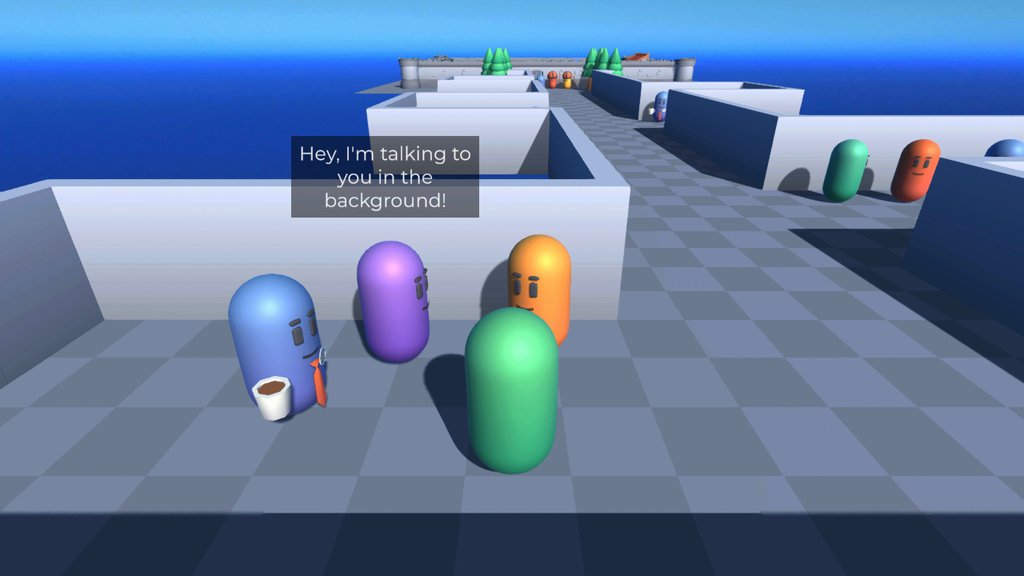
Running it
Open the BackgroundChatter scene in the Background Chatter sample’s folder and press Play.
- Move with W, A, S and D, or the arrow keys.
- When a character has something to say to you, an indicator appears over them. Press Space to talk to them.
- In a conversation, press Space, or click the button in the dialogue box, to continue. Click an option to choose it.
- Walk near characters to hear them chatter. You don’t need to press anything.
You can’t move while you’re in a conversation, but you can while background chatter is playing.
How it works
There’s one Dialogue Runner for the conversations the player starts, on the Dialogue System prefab. It uses the usual Line Presenter and Options Presenter. Every background conversation has its own Dialogue Runner, so it can run alongside the others and the primary one.
Each background conversation is an instance of the Background Conversation prefab, in the sample’s Prefabs folder. Its Dialogue Runner has no Yarn Project set. The Chatter Group sets it from its Dialogue setting each time the conversation starts. All the conversations use the same Yarn Project, BackgroundChatter.yarnproject.
Most of the background Dialogue Runners have no Variable Storage set, so each one adds its own In Memory Variable Storage when the game runs. A variable that one of these conversations changes is only changed for that conversation’s Dialogue Runner. The Background Conversations group is the exception: its Dialogue Runner’s Variable Storage is the Dialogue System’s.
Lines above heads
Each background Dialogue Runner has one Presenter, Background Chatter View, on the Background GameObject under the conversation’s own Canvas. Its script is Scripts/BackgroundChatterView.cs. It’s a Presenter you write yourself. It doesn’t show options, because nobody chooses them.
Every character who can speak in the background has a Chatter NPC component, from the ChatterNPC prefab. The Presenter finds the speaker by the GameObject’s name, so the name has to match the character name used in the Yarn Script. The player’s GameObject is called Player, so Player: Who, me? floats above the player. Chatter NPC’s Background Chatter Point is the point the line floats over. In the ChatterNPC prefab, that’s the Chatter Anchor child, above the character’s head.
var lineText = line.TextWithoutCharacterName.Text;

var npc = ChatterNPC.FindByName(characterName);

if (npc == null)
{
    Debug.LogWarning($"Failed to find an NPC for {line.TextID} (\"{line.Text.Text}\")", this);
    return;
}

attachmentTarget = npc.BackgroundChatterPoint;

text.text = lineText;

var durationMilliseconds = Mathf.Max(lineText.Length * millisecondsPerCharacter, this.minDuration * 1000);

try
{
    text.enabled = true;
    await YarnTask.Delay(TimeSpan.FromMilliseconds(durationMilliseconds), token.NextContentToken);
    text.enabled = false;
    await YarnTask.Delay(TimeSpan.FromMilliseconds(this.delayAfterLines), token.NextContentToken);
}
catch (System.OperationCanceledException)
{
}
finally
{
    if (text != null)
    {
        text.enabled = false;
    }

    attachmentTarget = null;

}LateUpdate() moves the label to the point on screen above them.The line stays on screen for 75 milliseconds per character, or 1.5 seconds if that’s longer. Then the label hides, and after another half a second the Presenter returns, so the Dialogue Runner moves on. These are the Presenter’s Milliseconds Per Character, Min Duration and Delay After Lines settings, in its Timing section.
Starting and stopping conversations
Each child of Chatter Group Manager has a Chatter Group, from Scripts/ChatterGroup.cs, and an Attach To Game Objects. Chatter Group says which Yarn node to run, and when:
| Setting | What it does |
|---|---|
| Start Immediately On Enter | Start as soon as the player is in range, instead of after a random delay. |
| Saliency Type | Which saliency strategy the conversation’s Dialogue Runner uses to pick lines and nodes. See the note below the table. |
| Out Of Range Behaviour | What happens if the player gets further away than Stop Radius while the conversation is running. Do Nothing lets it carry on. Stop stops it. Stop And Run Node stops it, then runs Out Of Range Dialogue. |
| Start Radius | The player has to be this close for the conversation to start. |
| Stop Radius | The distance at which Out Of Range Behaviour happens. |
| Dialogue Runner | The conversation’s own Dialogue Runner. |
| Dialogue | The Yarn Project, and the node or node group to run. |
| Out Of Range Dialogue | The node to run when the player walks away, if Out Of Range Behaviour is Stop And Run Node. |
| Interrupted By Primary Conversation | Stop this conversation when the primary Dialogue Runner starts. On by default. |
Chatter Group sets its Saliency Type strategy on its Dialogue Runner in Awake(). Every time StartDialogue() is called, though, a Dialogue Runner replaces the strategy with the one chosen in its own Saliency Strategy setting, unless that’s Custom. The background Dialogue Runners are left at Random Best Least Recently Viewed, so that’s the strategy they use, whatever Saliency Type says. To use Saliency Type, set the Dialogue Runner’s Saliency Strategy to Custom as well. See Custom Saliency Strategies.
Attach To Game Objects has a list of Targets, the characters taking part. Every frame it moves the group to the middle of them, so its start and stop radius go wherever they go. When you select a group, it shows its start radius as a yellow sphere in the Scene view, and its stop radius as a blue one.
Chatter Group Manager runs a loop for each group. It waits a random time between the two numbers in its Delay Between Chatters, which are 2 and 4 seconds in this scene, or a single frame if the group has Start Immediately On Enter on. Then, if the player is within the start radius and the group’s conversation isn’t already running, it starts the conversation and watches the player’s distance until it ends. A group that starts on enter waits for the player to walk out of range before it can start again, so it doesn’t repeat immediately.
When the player talks to someone, the primary Dialogue Runner invokes On Dialogue Start, and the manager stops every group that has Interrupted By Primary Conversation on:
public void InterruptAllChatter()
{
    foreach (var chatterGroup in chatterGroups)
    {
        if (chatterGroup.interruptedByPrimaryConversation)
        {
            chatterGroup.Interrupt().Forget();
        }
    }
}

public YarnTask Interrupt()
{
    if (dialogueRunner != null)
    {
        return dialogueRunner.Stop();
    }
    return YarnTask.CompletedTask;
}onDialogueStart event, in OnEnable().While the primary dialogue is running, the manager doesn’t start those groups either. They start again by themselves once it ends and the player is in range. See Async and Cancellation for what stopping a Dialogue Runner does.
The conversations
Each room, and each part of the market, shows a different way to write background chatter:
| Group | Speakers | What it shows |
|---|---|---|
| Demo_BackgroundConversation | BackgroundChatterA and B | A plain conversation, written as ordinary lines. |
| Demo_CallAndResponse and Call and Response | CallAndResponseA and B, BoredGuard1 and 2 | Two line groups, so each conversation is a random question and a random answer. |
| Demo_Interruption | InterruptionA and B | Talking to either character starts a conversation on the primary Dialogue Runner, which stops the chatter. |
| Demo_WalkAway and Fishmonger | WalkAway, the Fishmonger and the player | The player takes part. The conversation starts on enter, and walking away runs a different node. |
| Demo_Ongoing and Gossips | OngoingA and B, Gossip1 and 2 | A node group that plays the next part of the conversation each time. |
| Background Conversations | Townsperson1 and 2 | A node group of three conversations, with when: always on each. |
| RoamingCharacter | Wanderer | A character who walks a path while they chatter. |
| Town Crier | TownCrier | A line group with conditions on its lines. |
Line groups and node groups are the same features you’d use in any dialogue. The Dialogue Runner picks one item from the group each time, using its saliency strategy. See Saliency and Storylets.
The bored guards in the market use two line groups. Every answer makes sense after every question:
title: CallAndResponse
tags:
---
=> BoredGuard1: Can't believe I'm doing the night shift again.
=> BoredGuard1: Once took down a whole squad, single handed.
=> BoredGuard1: You hear that?
=> BoredGuard1: Ever visit the blue quarter after midnight? Wild times.
=> BoredGuard1: I hear the king has a new advisor. <<if $king_new_advisor>>
=> BoredGuard1: Can't wait for them to issue us new shoes.
=> BoredGuard1: My shield's getting rusty.

=> BoredGuard2: Yep.
=> BoredGuard2: Sure.
=> BoredGuard2: Yeah.
=> BoredGuard2: Mmm.
=> BoredGuard2: Uh-huh.
=> BoredGuard2: What?
=> BoredGuard2: Odd.
=> BoredGuard2: Don't care.
===$king_new_advisor is true. It’s declared in TownCrier.yarn, and starts false.The gossips are a node group, with a variable that counts how far through the story they are. Each time the player comes near, the next part plays:
title: OngoingBackgroundConversation
when: $gossip == 0
---
<<declare $gossip = 0>>

<<set $gossip += 1>>

Gossip1: Did you hear about Barbara?
Gossip2: About her new sword?
Gossip1: Wait, new sword?
Gossip2: Yes! I saw it when I was over for tea yesterday!
===
title: OngoingBackgroundConversation
when: $gossip == 1
---
<<set $gossip += 1>>

Gossip1: So she had her sword just.. hanging about?
Gossip2: Yes, casual as you like!
Gossip2: I said, "Barbara, that's rather sharp to be leaving out!"
Gossip1: And she took it figuratively?
Gossip2: She took it figuratively!
Gossip2: "Oh, thank you, I'm very proud of it!"
===$gossip is 0, so it’s the first part.$gossip == 2, follows it in the file.Demo_Ongoing in _Explanation.yarn does the opposite. It adds 1 to $ongoing_counter after its last line, so the player has to hear a whole part before the next one plays. Its last node has when: always, and plays once all the other parts have been heard.
The Fishmonger’s conversation includes the player. Its group has Start Immediately On Enter on, and its Out Of Range Behaviour is Stop And Run Node, with Out Of Range Dialogue set to InterruptableBackgroundChat_WalkAway:
title: InterruptableBackgroundChat
---
<<once>>
Fishmonger: You there! Interested in some fresh fish?
<<else>>
=> Fishmonger: Still got those fish!
=> Fishmonger: Nice fresh fish!
=> Fishmonger: Delicious fish!
    Fishmonger: Del-fish-ous, I'd say! <<once>>
<<endonce>>

=> Player: Are they any good?
=> Player: How fresh are they?
=> Player: Are they still cold?

=> Fishmonger: They're the finest around!
=> Fishmonger: Fresh off the cart, barely nine days out of the ocean!
=> Fishmonger: They're the choicest of fish!
=> Fishmonger: You've never had anything like them!

===
title: InterruptableBackgroundChat_WalkAway
---

=> Player: Maybe some other time.
=> Player: Not now.
=> Player: Not into fish.
===The Town Crier and the Wanderer can be talked to as well as heard. Each has a Dialogue Interactable that starts a node on the primary Dialogue Runner: TownCrierTalkTo and RoamingCharacterTalkTo. RoamingCharacterTalkTo uses the <<pause_path_movement Wanderer>> and <<resume_path_movement Wanderer>> Commands, from the shared Simple Character script, to stop the Wanderer walking while they talk, then send them on their way.
Things to try
- Select Town Crier under Chatter Group Manager, and turn off Interrupted By Primary Conversation. Talk to the Town Crier, and their announcements keep floating above them during the conversation.
- In
TownCrier.yarn, change<<declare $dragon_dead = false>>to<<declare $dragon_dead = true>>. The Town Crier announces that the dragon is slain, and tells you so when you ask for the news. Nothing in the sample sets$dragon_dead, so this is the only way to hear those lines. - Select Chatter Group Manager, and lower both numbers in Delay Between Chatters. The conversations that wait for a delay start again sooner.
- Select a group under Chatter Group Manager, and change its Start Radius and Stop Radius. Watch the yellow and blue spheres change size in the Scene view.