
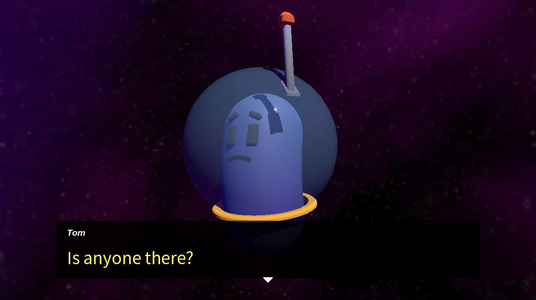
This sample plays the same conversation as the Voice Over sample, with Tom as a 3D character in a space helmet, floating in front of a nebula. His mouth moves in time with his recorded lines, and Commands in the Yarn Script turn and tilt his head and change his expression as he talks. Anne isn’t on screen. You only hear her.
Each line moves on by itself when its clip finishes.
Running it
Open samples/voice_over_3d/voice_over_3d.tscn and press Run Current Scene. The sample has sound.
- The conversation starts on its own, after the screen fades in.
- Press Enter or Space, or click, to skip to the next line before the clip has finished. Click an option to choose it.
- Press F10 to make Tom’s head follow the mouse pointer. Press it again to stop.
How it works
The Dialogue Runner has Auto Start on, and five Presenters. Four are the same as in the Voice Over sample. The fifth, LipSyncPresenter, moves Tom’s mouth.
The Voice-Over Presenter is set up as in the Voice Over sample, except that End Line When Voice Complete is on. When a clip finishes, the Voice-Over Presenter waits half a second, then ends the line, so the conversation plays through without the player. See Voice-Over.
The scene’s script points the Dialogue Runner at this sample’s English clips, in samples/voice_over_3d/dialogue/audio/en/. As in the Voice Over sample, the clips in other languages come from translation remaps in . The lines have the same line IDs as the Voice Over sample’s, so their text comes from the same VoiceOver.strings translations, which are listed for the whole project. This sample has no language menu.
Lip sync
Each clip has a .lipsync file with the same name, in a LipSync- folder for its language, like audio/LipSync-en/tutorial-tom-01.lipsync. Each row is a time in seconds and a mouth shape, separated by a tab:
0.00	X
0.05	B
0.25	C
0.60	B
1.15	C
1.35	E
The shapes are letters from A to H, plus TH and X. scripts/lipsync/lip_synced_texture_group.gd in the shared sample files lists what each one looks like. X is the mouth closed.
LipSyncPresenter, from samples/shared/scripts/lipsync/lip_sync_presenter.gd, is a Presenter, so the Dialogue Runner gives it each line at the same time as the Voice-Over Presenter. For each line, it:
- Finds a character in the scene with the same name as the line’s speaker. For Anne’s lines there isn’t one, so it does nothing.
- Loads the line’s
.lipsyncfile. It looks in the folder for the current language first, then inLipSync-en. - Waits for the Voice-Over Presenter’s Wait Time Before Start, so the mouth and the clip start together.
- Changes Tom’s mouth shape every frame, to the shape for the time that’s passed, until the last time in the file.
- Closes the mouth.
If the player continues early, it stops changing the shape, and closes the mouth.
Moving Tom
The Yarn Script is the Voice Over sample’s, with Commands added to move Tom. They’re methods in simple_character.gd, the script on Tom, so each one starts with the name of the character to move. See Commands.
<<set_animator_bool Tom Floating true>>
<<expression Tom frowning>>
<<face Tom surprised>>

<<set_fade_color 1>>

// Hold on a black screen for two seconds, then fade in.
<<wait 2>>
<<fade_up 2>>
<<wait 1>>

<<play_animation Tom Gesture LookAround wait>>

// The start of our conversation!
Tom: Uh.. hello? #line:tutorial-tom-01 // tentative
<<turn Tom 0.5 0.5>>
<<tilt_forward Tom -0.5 0.5>>
Tom: Is anyone there? #line:tutorial-tom-02wait makes the dialogue wait until he’s finished.wait, the dialogue doesn’t wait for them, so he moves as his next line starts.Later in the script, <<face Tom sus 0.25>>, <<face Tom neutral 0.25>> and <<face Tom angry 0.25>> change his eyebrows over a quarter of a second, and <<tilt_side Tom -0.5 0.5>> tilts his head to one side.
Things to try
- In
VoiceOver3D.yarn, change<<expression Tom frowning>>to<<expression Tom smiling>>. Tom talks with his smiling set of mouth shapes. - In
scripts/voice_over_3d_sample.gd, addTranslationServer.set_locale("de")to the end of_ready(). The conversation plays in German, with German text, German clips, and the German lip sync files. - Select
VoicePresenterand turn off End Line When Voice Complete. Each line now waits for you to continue.