
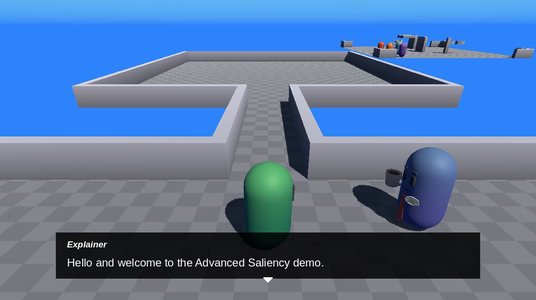
In this sample, you build a short scene out of storylets. You pick who plays the two roles, which room the scene is set in, and what kind of scene it is. Then you walk into the room and talk to the two characters. Every line they say comes from a node group, and the when: headers on each node decide which one runs. It’s a port of the Advanced Saliency sample from Yarn Spinner for Unity.
When you run it, you start in the setup room, next to the Explainer. Around the room are four pillars, each with a sign and a button. The signs show the current choices: “The Primary role is played by Alice”, “The Secondary role is played by Barry”, “It is set inside an Office” and “It will be an Interrogation scene”. Walk into a pillar’s button to change its choice. Talk to the Explainer to start the scene, then walk down the corridor into the scenario room, where the two characters are waiting.
Running it
Open samples/advanced_saliency/advanced_saliency.tscn and press Run Current Scene.
| Key | What it does |
|---|---|
| W, A, S, D or the arrow keys | Move |
| E | Talk to the character you’re next to |
| Enter, Space or a left click | Go to the next line |
The four pillars are:
| Pillar | Changes | Choices |
|---|---|---|
| PillarPrimary | Who plays the primary role | Alice, Barry, George, Liz |
| PillarSecondary | Who plays the secondary role | Alice, Barry, George, Liz |
| PillarRoom | The room | Office, Pub, Church, Mansion |
| PillarScenario | The scenario | Interrogation, Explore, Rescue, Date |
The Explainer won’t start the scene if the same character is in both roles. Every time you start a scene, the scenario room is rebuilt, so you can change the choices and play again.
How it works
There are three parts to the sample:
- The Yarn Scripts, which hold every scenario as a set of node groups.
- A custom Variable Storage, which lets the pillars change the Yarn variables.
- The level god, a node that builds the room when the Yarn Script tells it to.
The sample leaves the Dialogue Runner’s Saliency Strategy at the default, Random Best Least Recent. See Saliency and Storylets for how it picks.
ScenarioRoom, SetupRoom and Void are three copies of the same arena, and Bridge is the corridor between the first two. The script on the root node removes a wall tile from each end of the corridor, to make the doorways. The four characters start in Void, out of the way, until a scene needs them.
The choices are Yarn variables
Room.yarn declares an enum for each choice, and a variable to hold it. The enums use strings for their values:
<<enum Character>>
    <<case Alice = "Alice">>
    <<case Barry = "Barry">>
    <<case George = "George">>
    <<case Liz = "Liz">>
<<endenum>><<enum ScenarioState>>
<<case NotStarted>>
<<case Started>>
<<case Complete>>
<<endenum>>
<<declare $primary = Character.Alice>>
<<declare $secondary = Character.Barry>>
<<declare $scenario = Scenario.Interrogation>>
<<declare $Room = Room.Office>>
// the transient state variables we need to reset each run
<<declare $speak_to_primary = false>>
<<declare $speak_to_secondary = false>>
<<declare $scenario_state = .NotStarted>>The Dialogue Runner’s Variable Storage is TheRoomVariableStorage, a script that extends YarnInMemoryVariableStorage. It has a getter and a setter for each variable, using GDScript enums that match the Yarn ones. A Yarn enum with string values is stored as its string, so the setters store names like "Alice":
## the character playing the primary role
func get_primary() -> Character:
    return _to_enum(get_string("$primary", CHARACTER_NAMES[0]), CHARACTER_NAMES) as Character


func set_primary(value: Character) -> void:
set_value("$primary", CHARACTER_NAMES[value])Each pillar has a ValueUpdater for one of the four variables. When the player walks into the pillar’s ButtonBump, the ValueUpdater reads the variable through the Variable Storage, sets it to the next choice, and updates the sign. See Variables and Storage for more on custom Variable Storage.
Starting a scene
Talking to the Explainer runs the RoomSetup node. It can show the current choices, and if the roles are played by different characters, it offers to play the scenario. Choosing to play jumps to ResetAndPlay:
title: ResetAndPlay
---
<<set $speak_to_secondary = false>>
<<set $speak_to_primary = false>>
<<set $scenario_state = .NotStarted>>
<<start_level>>
===The level god adds the start_level Command in its _ready, with dialogue_runner.add_command("start_level", spawn_level). spawn_level() does four things:
- Removes the room it built last time, if there is one.
- Puts all four characters back where they started, in Void.
- Looks up the room’s
RoomLayoutin its Layouts dictionary, and moves the primary and secondary characters to the layout’s spots. - Adds the layout’s room model to ScenarioRoom.
Each room has a RoomLayout resource in the layouts folder, such as Pub.tres. A layout has a Primary and a Secondary CharacterSpawn, each with a position and a rotation, and an Environment Scene for the room. See Commands for more on adding Commands.
Every character goes to Primary or Secondary
Each character’s DialogueInteractable starts the node group with the character’s name. The scenarios are written for the primary and secondary roles, not for particular characters, so Room.yarn has two short nodes for each character that jump to the right group:
title: Alice
when: $primary == .Alice
---
<<jump Primary>>
===
title: Alice
when: $secondary == .Alice
---
<<jump Secondary>>
===A character who isn’t in either role has nothing that passes, so the DialogueInteractable doesn’t show the speaking indicator over them.
Scenarios as storylets
Each scenario is a set of nodes in the Primary and Secondary node groups. Every node checks $scenario, and most also check $scenario_state, and whether the player has talked to the other character yet. As the player talks to each character, the nodes change these variables, and different nodes start to pass.
title: Primary
when: $scenario == .Explore
when: $scenario_state == .NotStarted
---
Player: ok time to wander around aimlessly looking for stuff
{$primary}: Great idea
Player: ok, any idea where to look?
{$primary}: I think {$secondary} had some ideas
Player: gotcha

<<set $scenario_state = .Started>>
==={$primary} is the name of whoever plays the primary role, so the same node works for every character.The Rescue and Date scenarios work the same way, and so does Interrogation, which also uses line groups to change a line depending on the room.
More specific nodes win
The default strategy picks the candidate with the highest complexity, from the ones seen the fewest times. The sample uses this to give some combinations their own version of a scenario. Room-Explore-Mansion-Liz-Alice.yarn has a different Explore scenario, for when it’s set in the Mansion and Alice and Liz play the two roles:
title: Primary
when: $scenario == .Explore
when: $Room == .Mansion
when: $primary == .Alice || $primary == .Liz
when: $secondary == .Alice || $secondary == .Liz
when: $scenario_state == .NotStarted
---
Player: hey
{$primary}: Can't talk, I am too busy uncovering the Bone Secrets.
Player: that sounds cool
{$primary}: it will be, yes.
<<set $scenario_state = .Started>>
===||, so this node’s complexity is 7. The ordinary Explore node above has a complexity of 2.With that setup, both versions pass, and neither has been seen. The Mansion version has the higher complexity, so it wins. Every other node in the Mansion version has the same extra conditions, so they win over the ordinary Explore nodes for the rest of the scene.
Room-Interrogation.yarn does the same for one character. It adds a node to Alice’s own node group, with when: $primary == .Alice, the Interrogation conditions, and when: once. Its complexity of 4 beats the complexity of 1 on Alice’s node that jumps to Primary, so the first time Alice plays the primary role in an Interrogation, she gives a short speech of her own.
The view counts aren’t reset when a scene starts. Once you’ve played the Mansion version of Explore more times than the ordinary one, the ordinary Explore nodes have been seen fewer times. The default strategy looks at view counts before complexity, so it picks them instead.
Things to try
Select YarnDialogueRunner, and under Advanced, set Saliency Strategy to Best. The Best strategy ignores view counts, so the Mansion version of Explore plays every time you choose it.
Add a node to the Date scenario for one room, such as:
title: Secondary
when: $scenario == .Date
when: $scenario_state == .NotStarted
when: $Room == .Pub
---
{$secondary}: Fancy seeing you two in here.
===
A new node for Room-Date.yarn.It has one more condition than the ordinary Secondary node for a Date that hasn’t started. In a Date in the Pub, the first time you talk to the secondary character, they say the new line.