
This sample gives the Dialogue Runner its own saliency strategy, WeightedSaliencyStrategy. It picks content at random, with some content more likely to be picked than the rest. Each node gets its weight from a weight: header, and each line in a line group gets its weight from a #weight: tag.
When you run it, there are two characters to talk to. Alice has a node group of five nodes, and Barry has a line group of three lines. Each node and line says how many chances it has of being picked. Talk to them several times to see which comes up most.
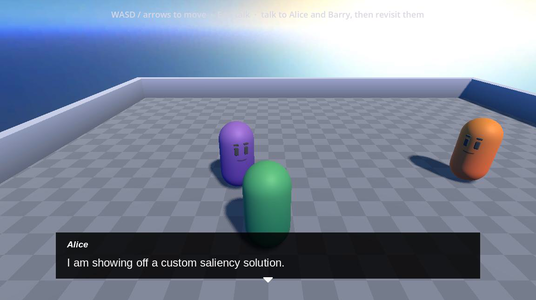
Running it
Open samples/custom-saliency/custom_saliency.tscn and press Run Current Scene.
| Key | What it does |
|---|---|
| W, A, S, D or the arrow keys | Move |
| E | Talk to the character you’re next to |
| Enter, Space or a left click | Go to the next line |
Alice is the purple character, and Barry is the orange one.
How it works
The script on the scene’s root node gives the Dialogue Runner the new strategy. When the dialogue reaches Alice’s node group or Barry’s line group, the Dialogue Runner asks WeightedSaliencyStrategy to pick. See Custom Saliency Strategies for how a strategy works.
Weights in Yarn
Alice’s node group has five nodes. The first two are:
title: Alice
when: always
---
<<detour AliceIntro>>

Alice: This node only has one chance of being selected.
Alice: You should revisit me to see if I show another.

===

title: Alice
when: always
weight: 2
---
<<detour AliceIntro>>

Alice: This node has two chances of being selected
Alice: You should revisit me to see if I show another.

===weight: header, so the strategy gives this node a weight of 1.when: once. Alice introduces the sample the first time you talk to her, and never again.The other three nodes have weights of 3, 4 and 5. The weights add up to 15, so the first node has a 1 in 15 chance of being picked, and the last has a 5 in 15 chance.
Barry has one node, which uses line groups:
title: Barry
when: always
---
<<if !visited("Barry")>>
    Barry: I am showing off custom weighted saliency.
    => Barry: But doing it through line groups instead of nodes. <<if visited("Alice")>>
    => Barry: where each line in the line group has its own weighting. <<if !visited("Alice")>>
    Barry: See [link="weighted_saliency_strategy.gd"]weighted_saliency_strategy.gd[/link] to see how it works.
<<endif>>

=> Barry: This line has a weight of 1 #weight:1
=> Barry: This line has a weight of 2 #weight:2
=> Barry: This line has a weight of 3 #weight:3

===visited("Barry") is false.#weight: tag. The weights add up to 6, so the last line is picked half the time.The strategy
WeightedSaliencyStrategy extends YarnSaliencyStrategy. Its select_candidate() works like a dice roll:
func select_candidate(candidates: Array[Dictionary], context: Dictionary) -> int:
    var vm: Variant = context.get("vm")

    # Each entry: the original candidate index plus its inclusive [min, max] range
    # on the dice.
    var ranges: Array[Dictionary] = []
    var dice_size := 0

    for i in range(candidates.size()):
        var candidate := candidates[i]

        # Drop anything that failed a condition.
        if candidate.get("conditions_failed", 0) > 0:
            continue

        var weight := _weight_for(candidate, vm)
        ranges.append({"index": i, "min": dice_size, "max": dice_size + weight - 1})
        dice_size += weight

    # No valid content: signal that nothing should run.
    if ranges.is_empty():
        return -1

    # Roll the dice and return whichever candidate's range contains it.
    var roll := randi_range(0, dice_size - 1)
    for entry in ranges:
        if roll >= entry.min and roll <= entry.max:
            return entry.index

return -1- It skips every candidate with a failed condition.
- It gives each of the others a range of numbers as wide as its weight. With weights of 1, 2 and 3, the ranges are 0, 1 to 2, and 3 to 5.
- It picks a random number from 0 up to the total weight, less 1, and returns the index of the candidate whose range it’s in.
- If no candidate passes, it returns
-1, so nothing runs.
Because candidates that fail are left out before the roll, a candidate’s chance depends on which others pass at the time.
_weight_for() finds each candidate’s weight. It uses the vm entry in context, which is the Dialogue Runner’s virtual machine:
func _weight_for(candidate: Dictionary, vm: Variant) -> int:
    var content_id: String = candidate.get("content_id", "")
    var weight_string := ""

    if vm != null and not content_id.is_empty():
        if candidate.get("content_type", ContentType.LINE) == ContentType.NODE:
            # Node group: the weight lives in a node header.
            weight_string = vm.get_header_value(content_id, WEIGHT_KEY)
        elif vm.program != null:
            # Line group: the weight lives in a "#weight:N" line-metadata tag.
            weight_string = vm.program.get_metadata_value(content_id, WEIGHT_KEY + ":")

    weight_string = weight_string.strip_edges()
    if not weight_string.is_valid_int():
        return 1

return maxi(1, weight_string.to_int())For a node, content_id is the node’s name, and get_header_value() reads its weight header. For a line, content_id is the line’s ID, and get_metadata_value() finds the tag that starts with weight: and returns the rest of it. If there’s no weight, or it isn’t a whole number, or it’s less than 1, the weight is 1.
The strategy doesn’t remember anything between picks, so its on_candidate_selected() does nothing. This matters because the DialogueInteractable on each character calls has_salient_content() to decide whether to show the speaking indicator, and that calls select_candidate() as well. A strategy that changed something in select_candidate() would change it every time the player walked near a character.
The built-in strategies count how many times each candidate has been seen. This one doesn’t, so it can pick the same node or line several times in a row. when: once on AliceIntro still works, because once is a condition, and the strategy never picks a candidate whose conditions fail.
Setting the strategy
extends Node3D

## Installs the sample's custom weighted-random saliency strategy on the dialogue
## runner.

@export var dialogue_runner: YarnDialogueRunner


func _ready() -> void:
    if dialogue_runner == null:
        push_error("custom saliency: no dialogue runner assigned")
        return

    # Install the custom weighted strategy for the runner's Custom saliency
    # setting.
dialogue_runner.set_content_saliency_strategy(WeightedSaliencyStrategy.new())The Dialogue Runner’s Saliency Strategy is set to Custom in the Inspector, so it’s clear that the strategy comes from code. A strategy isn’t a resource, so you can’t assign it in the Inspector. set_content_saliency_strategy() gives it to the Dialogue Runner when the scene starts.
Things to try
- Change Alice’s last node from
weight: 5toweight: 50. She’ll say “This node has five chances of being selected” nearly every time. - Change
#weight:1on Barry’s first line to#weight:10. It becomes the line he says most often. - Comment out the
set_content_saliency_strategy()line incustom_saliency.gd. With no custom strategy to use, the Dialogue Runner falls back to Random Best Least Recent, which ignores the weights. Alice says each of her five nodes once before she repeats any of them.