
Inline Events
This sample uses markup to run game code in the middle of a line. When the typewriter reaches a [move/] tag, the player walks to a marker in the scene, and the rest of the line waits until they get there. When it reaches an [emotion/] tag, the speaker’s face and colour change.
When you run it, you control the player in a small arena. Walk up to Alice and talk to her. Partway through one of the player’s lines, the player walks across the arena. Later, Alice turns red and frowns in the middle of a word, and goes back to blue when she calms down.
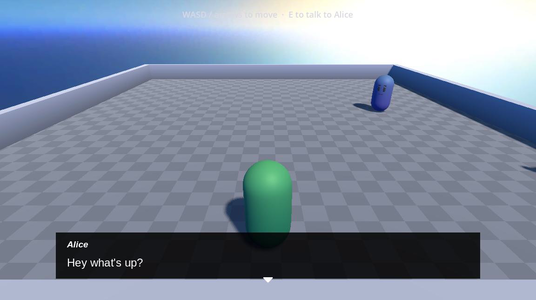
Running it
Open samples/inline_events/inline_events.tscn and press Run Current Scene.
- Move with W, A, S and D, or the arrow keys.
- Walk up to Alice and press E to talk to her.
- Press Enter or Space, or click, to continue.
How it works
The scene has two event handler nodes, MoveEvent and EmotionEvent. Both are listed in the Line Presenter’s Event Handlers, so the Line Presenter calls them for every line it shows. See Running code partway through a line for how event handlers work.
near and far are Marker3D nodes that mark the two places the player walks to.
Moving partway through a line
These lines are in InlineExample.yarn:
Player: So what, just part way through I stop talking... [move name="far" /] ...and move on over?
Alice: Yeah you did

// move back
Player: hang on a second
<<move near>>
Player: is it just for movement?The first line has a [move name="far" /] tag in it. When the typewriter reaches the tag, the player walks to the far marker. The rest of the line types out once they arrive.
The <<move near>> Command walks the player back to the near marker. It runs between lines, so the dialogue waits for the walk before the next line appears. MoveEvent registers this Command too, with add_command(), so the same script handles both. See Commands.
MoveEvent finds every [move] tag in a line before any of the line is shown:
	for attribute in markup.attributes:
		if attribute.name != "move":
			continue
		var marker_name := attribute.try_get_string_property("name")
		if marker_name.is_empty():
			continue
		var marker := _find_node_named(marker_name)
		if marker is Node3D:
_movements[attribute.position] = (marker as Node3D).global_positionmove tags.name value, like far.Then, as each character is about to appear, it checks whether there’s a walk at that position:
func on_character_will_appear(
	character_index: int,
	_line: Variant,
	cancellation_token: Variant = null
) -> Signal:
	if player_character == null or not _movements.has(character_index):
		return Signal()
	var token := cancellation_token as YarnCancellationToken
	if token != null and token.is_hurry_up_requested:
		return Signal()
	var target_position: Vector3 = _movements[character_index]
	var offset := player_character.global_position - target_position
	if Vector2(offset.x, offset.z).length() <= 0.05:
		return Signal()
	# Drive the (coroutine) walk separately and pause the typewriter on a real
	# signal, as returning a coroutine's own await wouldn't surface as a Signal.
	_run_walk(target_position, token)
return _walk_finished[move] tag here, so the typewriter carries on._run_walk() emits _walk_finished when the player arrives. If the player presses continue during the walk, it emits the signal immediately, so the line finishes typing while the player keeps walking.
Changing emotion partway through a line
These lines are in the same Yarn Script:
Alice: Yes... which I would have shown had [b]you[emotion="angry" /] [/b] not interrupted me.
Player: oh sorry
Alice: [i]sigh[/i] [emotion="neutral" /]it's ok.When the typewriter gets past “you”, Alice gets angry. Two lines later, she goes back to neutral after “sigh”.
[emotion="angry" /] is the short form of a tag with one value. The value is stored under the tag’s own name, so the script reads it with try_get_string_property("emotion").
EmotionEvent changes whoever is speaking the line. It gets the speaker’s name from the line, then finds a node with that name in the scene:
	var character_name := markup.get_character_name()
	if character_name.is_empty():
		push_warning("EmotionEvent: line has no character")
		return

	var target := _find_node_named(character_name)
	if target == null:
		push_warning("EmotionEvent: scene has no one called %s" % character_name)
		return
	_appearance = _find_appearance(target)
	_character = target as SimpleCharacter

	for attribute in markup.attributes:
		if attribute.name != "emotion":
			continue
		var emotion := attribute.try_get_string_property("emotion")
		if not emotion.is_empty():
_emotions[attribute.position] = emotionAlice.Alice in the scene.CharacterAppearance, which sets its colours, and the character itself, which sets its face.emotion tag’s value, keyed by its position in the line.The looks for each emotion are in EmotionEvent’s Emotion Presets, in the Inspector. Each preset is an EmotionPreset resource with an Eyebrows and Mouth expression, and a Base and Fade colour. The scene has two:
| Key | Eyebrows | Mouth | Colours |
|---|---|---|---|
angry | angry | frowning | Red and orange |
neutral | neutral | smiling | Alice’s usual blues |
When the typewriter reaches an emotion tag, EmotionEvent applies that preset to the speaker. For any emotion other than the Default Emotion, neutral, it also returns a 0.3 second timer, so the typewriter pauses for a moment and the change is easy to see.
The Dialogue Runner’s dialogue_cancelled signal is connected to EmotionEvent in the Node dock. If the dialogue is stopped while Alice is angry, EmotionEvent sets her back to the neutral preset.
The links
Alice’s line about inline event markup has a [link] to this page. Her last line links “Move Event” and “Emotion Event” to move_event.gd and emotion_event.gd. The LinkOpener node under the Line Presenter handles the clicks. It opens a web address in your browser, and for a file name, it finds the file under res://samples and opens it. See Links.
Things to try
- In
InlineExample.yarn, move[emotion="angry" /]to the start of Alice’s line, so she gets angry before she says anything. - Delete the
<<move near>>line, and put[move name="near" /]in the middle of “is it just for movement?”. The player walks back partway through that line instead of before it. - Add a
Marker3Dsomewhere else in the arena, give it a name, and use that name in a[move]tag.