
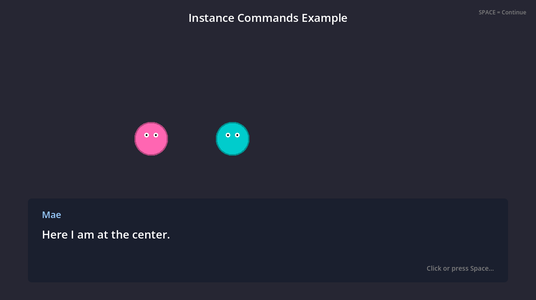
This sample shows Commands that belong to a node. Two characters, Mae and Bob, share one script with four Commands in it: <<move>>, <<bounce>>, <<look_at>> and <<set_color>>. In Yarn, the first argument of each Command is the name of the node to run it on, so <<bounce bob>> makes Bob bounce and <<bounce mae>> makes Mae bounce.
When you run it, Mae walks to the middle of the screen and Bob bounces. Then you choose whether they swap places, change colours, or both bounce, and they walk back to where they started.
Running it
Open samples/instance_commands/instance_commands.tscn and click Run Current Scene. Click Start to begin.
Press Space or Enter, or click, to move on to the next line. Click an option to choose it, or use the arrow keys and press Enter. When the dialogue ends, click Restart to run it again. Mae and Bob go back to their starting places and colours first.
How it works
The Dialogue Runner’s Presenters are set in the Inspector to the LinePresenter and OptionsPresenter nodes. game.gd, on the root node, starts the Start node when you click Start, after resetting each character in its Characters list. Its methods are connected to the button’s pressed signal and the Dialogue Runner’s dialogue_completed signal in the Node dock. It doesn’t set up any Commands: the Dialogue Runner finds them in character.gd by itself.
The characters are drawn by character.gd, which draws a circle in the node’s Character Color, with two eyes. The pupils look straight ahead until <<look_at>> turns them. The Marker2D nodes under Waypoints are the places the characters can move to.
The Commands
Each Command is a method whose name starts with _yarn_command_. The rest of the name is the Command’s name in Yarn. Because the methods aren’t static, each one belongs to a node, and Yarn has to say which node to call it on.
Method in character.gd | In Yarn | What it does | Waits? |
|---|---|---|---|
_yarn_command_move(destination) | <<move mae center>> | Walks to the node called destination. | Yes |
_yarn_command_bounce() | <<bounce bob>> | Jumps up and lands again. | Yes |
_yarn_command_look_at(target_name) | <<look_at mae bob>> | Moves the pupils to look at the node called target_name. | No |
_yarn_command_set_color(color_name) | <<set_color mae purple>> | Changes the character’s colour. | No |
The Command is called <<bounce>> because <<jump>> is already part of the Yarn language.
<<move>> and <<bounce>> return their tween’s finished signal, so the dialogue waits for them before it carries on. <<look_at>> and <<set_color>> return nothing, so they happen at once.
func _yarn_command_move(destination: String) -> Signal:
    var target := _find_destination(destination)
    if target == null:
        push_warning("Character '%s': destination '%s' not found" % [name, destination])
        return get_tree().process_frame

    # Calculate movement duration based on distance and speed
    var distance := position.distance_to(target.position)
    var duration := distance / move_speed

    # Tween to the destination
    var tween := create_tween()
    tween.tween_property(self, "position", target.position, duration)

    print("Character '%s' moving to '%s' (%.1f pixels, %.1fs)" % [name, destination, distance, duration])
return tween.finished_find_destination() looks through the scene for a Node2D with the name it’s given. If it can’t find one, <<move>> logs a warning and the dialogue carries on after one frame. The character moves at Move Speed pixels per second, which is 200 unless you change it in the Inspector.
Each Command prints a message to Godot’s Output panel when it runs.
For more on Commands that belong to a node, see Commands on a node.
The Yarn Script
title: Start
---
Mae: Hello! Watch me move to the center!
<<move mae center>>
Mae: Here I am at the center.

<<bounce bob>>
Bob: Hey Mae! I just bounced!

<<look_at mae bob>>
Mae: Let me turn to face you.

What should we do next?
-> Swap places
    <<move mae right_spot>>
    <<move bob left_spot>>
    Mae: We swapped!
    Bob: Fun!
-> Change colors
    <<set_color mae purple>>
    <<set_color bob orange>>
    Mae: I'm purple now!
    Bob: And I'm orange!
-> Both bounce
    <<bounce mae>>
    <<bounce bob>>
    Mae: Wheee!

<<move mae left_spot>>
<<move bob right_spot>>
Mae: Thanks for watching!
Bob: Goodbye!
===mae is the name of the node to call the Command on. center is passed to _yarn_command_move() as destination. The next line waits until Mae arrives.<<bounce>> takes no other arguments, so the node’s name is the only one._yarn_command_look_at("bob") on mae, so Mae looks towards Bob.<<set_color>> doesn’t wait, so both colours change before the next line.The node names in the scene, mae and bob, are separate from the character names in the lines, Mae and Bob. A line’s character name is only used for showing the line. The first argument of a Command has to match a node’s name.
Things to try
- Change
<<set_color mae purple>>to<<set_color mae #ff8800>>.set_colortakes a hex code as well as a colour name, as long as the hex code starts with#. - Add a
Marker2DunderWaypointscalledtop_spot, move it somewhere higher up, and add<<move bob top_spot>>to the script. - Duplicate
bobin the scene, rename the copykim, and give it a different Character Color.kimhas all four Commands, so<<bounce kim>>works without any other changes.