
This sample connects Yarn Commands and Functions to methods on ordinary nodes in the scene: a camera, a screen overlay and a player. The connections are made with a YarnBindingLoader, which maps each name in Yarn to a node and a method, so the methods don’t need special names. Every binding is set up in the Inspector, and the sample’s scripts don’t register anything themselves.
When you run it, a merchant greets you as the screen shakes. You can buy a health potion or a sword, ask for a dramatic entrance, flash the screen, or take a mysterious key. A panel in the top right shows your health, gold and inventory as they change.
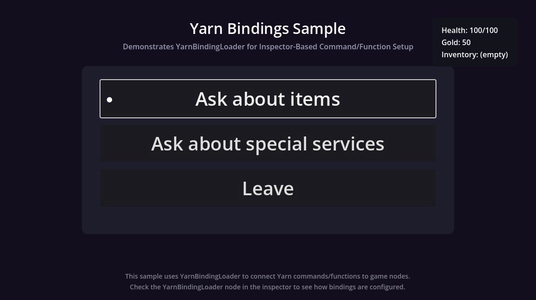
Running it
Open samples/commands_and_functions/scenes/bindings_sample.tscn and click Run Current Scene. Click Start Dialogue to begin.
Press Space or Enter, or click, to move on to the next line. Click an option to choose it, or use the arrow keys and press Enter.
When the dialogue ends, click Restart to reset your health, gold, inventory and the camera, then Start Dialogue to play again.
How it works
Three nodes have the methods that the Commands and Functions call:
| Node | Script | Commands | Functions |
|---|---|---|---|
Camera2D | camera_effects.gd | <<shake>>, <<shake_and_wait>>, <<zoom>> | |
ScreenEffects | screen_effects.gd | <<fade_out>>, <<fade_in>>, <<flash>> | |
Player | player.gd | <<give_item>>, <<heal>> | player_health(), has_item() |
The Dialogue Runner’s Presenters are the LinePresenter and OptionsPresenter nodes, and it has Show Selected Option as Line turned on, so the option you choose is shown as a line before the dialogue carries on.
The script on the root node, bindings_sample.gd, shows the status panel and handles the Start Dialogue and Restart buttons. Its methods are connected to the buttons’ pressed signals, the Dialogue Runner’s dialogue_completed signal and the YarnBindingLoader’s signals in the Node dock.
Connecting the Commands and Functions
Select the YarnBindingLoader node and look at its Bindings list in the Inspector. Each entry is a YarnCommandBinding resource, saved in the sample’s bindings folder:
| Yarn Name | Type | Target Node | Method Name | Parameter Count |
|---|---|---|---|---|
give_item | Command | ../Player | add_item | |
heal | Command | ../Player | modify_health | |
shake | Command | ../Camera2D | shake | |
shake_and_wait | Command | ../Camera2D | shake_and_wait | |
zoom | Command | ../Camera2D | zoom_to | |
fade_out | Command | ../UILayer/ScreenEffects | fade_out | |
fade_in | Command | ../UILayer/ScreenEffects | fade_in | |
flash | Command | ../UILayer/ScreenEffects | flash | |
player_health | Function | ../Player | get_health | 0 |
has_item | Function | ../Player | has_item | 1 |
Yarn Name is the name to use in Yarn, so the first one is <<give_item>>. Target Node is a path from the YarnBindingLoader to the node to call the method on, and Method Name is the method. A Function also needs its Parameter Count, the number of arguments it takes in Yarn.
The YarnBindingLoader finds the Dialogue Runner by itself, because they share a parent. Auto Register is on, so it registers every binding in the list when the scene starts. With Verbose on, it prints each one to the Output panel as it’s registered.
Yarn Spinner finds the bindings when it writes the Yarn Project’s .ysls.json, along with the parameters of each method they point to, so your editor knows about these Commands and Functions.
For other ways to add Commands, see Commands.
Commands that make the dialogue wait
Some of the methods return a Signal, and the dialogue waits until it’s emitted before running the next line. The others return nothing, so the dialogue carries on at once.
## Zooms the camera in or out (async - dialogue waits).
## Bound as: <<zoom 1.5 0.5>>
func zoom_to(target_zoom: String, duration: String = "0.3") -> Signal:
    var target := float(target_zoom)
    var time := float(duration)

    var tween := create_tween()
    tween.tween_property(self, "zoom", Vector2(target, target), time)

    return tween.finished
zoom_to() returns its tween’s finished signal, so the dialogue waits until the zoom is done. The parameters are Strings, so the method converts them to numbers itself, and duration has a default, so <<zoom 1.5>> also works.
| Command | Waits? |
|---|---|
<<shake intensity>> | No |
<<shake_and_wait intensity duration>> | Yes |
<<zoom level duration>> | Yes |
<<fade_out duration>> | Yes |
<<fade_in duration>> | Yes |
<<flash colour duration>> | Yes |
<<give_item name>> | No |
<<heal amount>> | No |
The merchant’s dramatic entrance uses several in a row. Each one finishes before the next starts:
-> Get a dramatic entrance (free)
    Merchant: Very well, prepare yourself!
    <<fade_out 0.3>>
    <<wait 0.5>>
    <<zoom 1.5 0.3>>
    <<fade_in 0.3>>
    <<shake_and_wait 0.8 1.0>>
    <<heal -20>>
    <<zoom 1.0 0.5>>
    Merchant: How was that?
<<jump Services>><<wait>> is built in, so it doesn’t need a binding.Keeping track of health, gold and items
$gold is a Yarn variable, changed with <<set>> in Bindings.yarn. Your health and inventory belong to the Player node. Commands change them: <<heal>> adds to health, or takes away from it if the amount is negative, and <<give_item>> adds to inventory. Functions let the Yarn Script read them back.
The status panel reads $gold from the Dialogue Runner’s Variable Storage, and health and inventory from the Player node, every frame while the dialogue is running.
Restart resets the Player node and the camera, and clears the Variable Storage, so everything starts from the same values again. See Variables and Storage.
Functions
player_health() calls get_health() on the Player node, and has_item() calls has_item(). The methods return a value, and the Yarn Script uses it in conditions and in lines:
title: MainMenu
position: 65,237
---
// Show player status
Merchant: You have {$gold} gold coins.

<<if player_health() < 100>>
    Merchant: You look a bit worn. Your health is only {player_health()}.
<<endif>>

-> Ask about items
    <<jump Shop>>
-> Ask about special services
    <<jump Services>>
-> Leave
    <<jump Farewell>>
===Player node for its health. After the dramatic entrance, it’s below 100.has_item() takes one argument, the name of an item. The Shop node only offers the sword if not has_item("sword"), and the Services node only offers the key if not has_item("mysterious_key"). The Farewell node checks has_item("mysterious_key") to choose what the merchant says.
A Function’s job is to return a value, so neither of these changes anything. Changes go through Commands, like <<heal>> and <<give_item>>. See Functions.
Things to try
- In the Services node, add
<<flash red 0.5>>beforeMerchant: Very well, prepare yourself!.flash()recognises white, black, red, green, blue and yellow. - Add a Function that counts your items. In
player.gd, add a method that returnsinventory.size()as anint. Then select theYarnBindingLoader, add an element to Bindings, choose New YarnCommandBinding, and set its Yarn Name toitem_count, its Type to Function, its Target Node to../Player, its Method Name to your method’s name, and its Parameter Count to 0. In the MainMenu node, addMerchant: You're carrying {item_count()} things.