
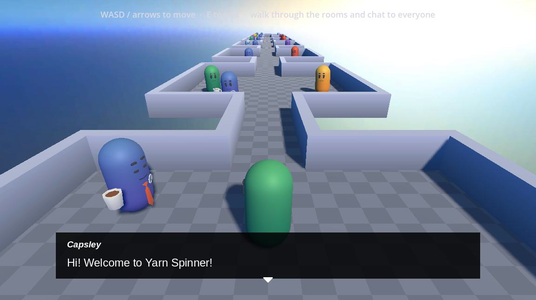
The Feature Tour is a row of seven rooms. Each room has characters whose dialogue shows off part of the Yarn language: lines and options, jumps, detours, variables, enums, if statements, <<once>>, Commands, Functions, smart variables, line groups and node groups. A blue character called Capsley stands in every room and tells you what the room is about.
You walk the player character from room to room and talk to whoever you like. All the dialogue is in one Yarn Script, and every character starts a different node in it.
Running it
Open samples/feature_tour/feature_tour.tscn and click Run Current Scene.
| Control | What it does |
|---|---|
| W, A, S, D or the arrow keys | Walk. |
| E | Talk to the character you’re standing next to. A speaking indicator appears on a character when you’re close enough. |
| Space, Enter or a left click | Move on to the next line. |
| A left click, or the arrow keys and Enter | Choose an option. |
The dialogue doesn’t start by itself. Walk up to Capsley in the first room and press E to begin.
What’s in each room
| Room | Characters | What the dialogue shows | Yarn node |
|---|---|---|---|
| 1 | Capsley | An introduction to the tour | Capsley_Welcome |
| 2 | Bob | Nodes and lines | Room2_Nodes_and_Lines |
| 2 | Bill | Options, and <<jump>> to another node | Room2_Options_and_Jumps_1 |
| 3 | Bruce | <<detour>> to another node and back | Room3_Detours_1 |
| 4 | Ogbert | A variable used as the character’s name, set by an option | Room4_Variables_1 |
| 4 | Sally | Number and boolean variables | Room4_Variables_2 |
| 5 | Mary | <<if>> and <<else>> | Room5_IfStatements_1 |
| 5 | Thor | An option with a condition | Room5_ConditionalOptions_1 |
| 5 | Ruby | An enum | Room5_Enums_1 |
| 5 | Norb | <<once>> | Room5_Once_1 |
| 6 | Derek | The built-in <<wait>> Command | Room6_Commands_1 |
| 6 | Beryl | The built-in dice() and random_range() Functions | Room6_Functions_1 |
| 6 | Reginald | A smart variable | Room6_SmartVariables_1 |
| 7 | Sven | A line group | Room7_LineGroups_1 |
| 7 | Dr Node | A node group | Room7_NodeGroups_1 |
Capsley’s node in each room is Capsley_Room2 to Capsley_Room7. For how each feature is written, see Writing Yarn Scripts.
Some characters react to what you did elsewhere. Mary and Thor say different things once you’ve talked to Sally, and Dr Node’s dialogue depends on the meal you chose with Ruby and on how much gold you have left after Reginald.
How it works
The scene
There’s one Dialogue Runner for the whole building. Its Yarn Project is Tour.yarnproject, and its Presenters are the shared Line Presenter and Options Presenter from samples/shared/ui/. See The Dialogue Runner.
Each character has a child node with the shared dialogue_interactable.gd script. Its Node Name is the Yarn node to start, and its Dialogue Runner points at the scene’s one Dialogue Runner. When you press E next to a character, the script calls start_dialogue() with that node name, and waits for dialogue_completed. A character can’t be talked to while another conversation is running. If the node name is a node group, it can only be talked to if something in the group can run. CharacterAppearance gives each character its own colours.
Declaring the variables
All the variables in the tour are declared at the top of Capsley’s first node. Declarations aren’t run like other statements. They apply to the whole Yarn Project, so every node can use these variables, even if you never talk to Capsley.
<<declare $NPC_Variables_Name = "Ogbert">>
<<declare $player_gold = 10>>
<<declare $player_spoke_to_sally = false>>
<<enum Meal>>
  <<case None>>
  <<case Ramen>>
  <<case Pizza>>
  <<case MeatProduct>>
  <<case Sludge>>
<<endenum>>
<<declare $player_meal = Meal.None>>
<<declare $player_can_afford_bribe = $player_gold >= 6>>true when you talk to Sally. Mary and Thor check it.None. Dr Node checks it.true while you have at least 6 gold. See Smart Variables.The smart variable
Reginald checks $player_can_afford_bribe. Nothing in the script sets it. Its value is worked out from $player_gold each time it’s read.
<<if $player_can_afford_bribe>>
    Reginald: Anyway. #line:Room6_SmartVariables_1_0400_Reginald
    Reginald: I know you can afford to bribe me because you have enough gold. #line:Room6_SmartVariables_1_0500_Reginald
<<set $player_gold = $player_gold - 6>>You start with 10 gold, so the first time you talk to Reginald you can afford it, and he takes 6. That leaves 4, so $player_can_afford_bribe is now false. The next time, he says you can’t afford to bribe him.
Dr Node’s node group
Dr Node starts Room7_NodeGroups_1, which is a node group of five nodes with the same title. Each has when: headers that say when it can run. When the dialogue starts there, the Dialogue Runner picks one of the nodes that can run.
when: headers | What Dr Node talks about |
|---|---|
when: once and when: !visited("Room7_NodeGroups_1") | How node groups work. Only shown once. |
when: !$player_can_afford_bribe | You can’t afford a bribe. |
when: $player_meal == .None | You haven’t got a meal. |
when: $player_meal == .Ramen | You have ramen. |
when: always | This node is a fallback. |
The first time you talk to him, the node with once runs. Its two when: headers make it more specific than the nodes with one, so it wins even when another node, like the .None one, could run. After that, what he says depends on what you’ve done in rooms 5 and 6. The when: always node means there’s always something that can run, so you can talk to him as many times as you like. See Saliency and Storylets for how the Dialogue Runner picks.
Things to try
- In
Tour.yarn, change<<declare $player_gold = 10>>to<<declare $player_gold = 4>>. Sally tells you that you have 4 gold, Reginald says you can’t afford to bribe him, and after Dr Node’s first conversation, hiswhen: !$player_can_afford_bribenode can be picked. - Add a fourth line to Sven’s line group in
Room7_LineGroups_1, starting with=> Sven:. Talk to him a few times to see each greeting.