
Installing Yarn Spinner for Godot (GDScript)

The best way to get Yarn Spinner for Godot (GDScript) is to buy Yarn Spinner+ for Godot (GDScript) from our itch.io store. Buying it helps us keep making Yarn Spinner, and it comes with two extra dialogue systems, Classic RPG and Snaaake. It’ll be on the Godot Asset Store once the store allows paid assets.
- Go to Yarn Spinner+ for Godot (GDScript) on itch.io, and click Buy Now.
- When you’ve paid, click Download, and download the file.
- Unzip it. Inside is an
addonsfolder. - Copy the folders inside it into your Godot project’s
addonsfolder. If your project doesn’t have one, make it.
When you’re done, you should have res://addons/yarn_spinner/plugin.cfg in your project, with the add-ons next to yarn_spinner.
The Godot Asset Store is in beta, and only allows free assets for now. Paid assets are on its roadmap, but there’s no date yet. Yarn Spinner+ for Godot (GDScript) will be there as soon as the store allows paid assets.
Until then, buy it from our itch.io store.
The free version is in the YarnSpinner-Godot-GDScript repository on GitHub. The addon is the addons/yarn_spinner folder inside it. Only that folder goes into your project.
Clone or download the repository, then copy the folder into your project or link to it.
To copy it, copy addons/yarn_spinner from the repository into your project’s addons folder.
To link to it, make a symbolic link in your project’s addons folder that points to the folder in the repository. When you update the repository, your project picks up the new version.
On macOS or Linux:
ln -s /path/to/YarnSpinner-Godot-GDScript/addons/yarn_spinner \
/path/to/your-game/addons/yarn_spinnerOn Windows, use an administrator Command Prompt, or turn on Developer Mode first:
mklink /D "C:\path\to\your-game\addons\yarn_spinner" ^
"C:\path\to\YarnSpinner-Godot-GDScript\addons\yarn_spinner"Either way, you should end up with res://addons/yarn_spinner/plugin.cfg in your project.
What each version includes
| Yarn Spinner+ from itch.io | Free, from GitHub | |
|---|---|---|
| Yarn Spinner for Godot (GDScript) | ✅ | ✅ |
| Localisation with Godot’s translation system | ✅ | ✅ |
| Voice-over | ✅ | ✅ |
| The free samples | ✅ | ✅ |
| Classic RPG and Snaaake add-ons | ✅ | ❌ |
| Community support | ✅ | ✅ |
| Direct support | ✅ | ❌ |
Turning on the plugin
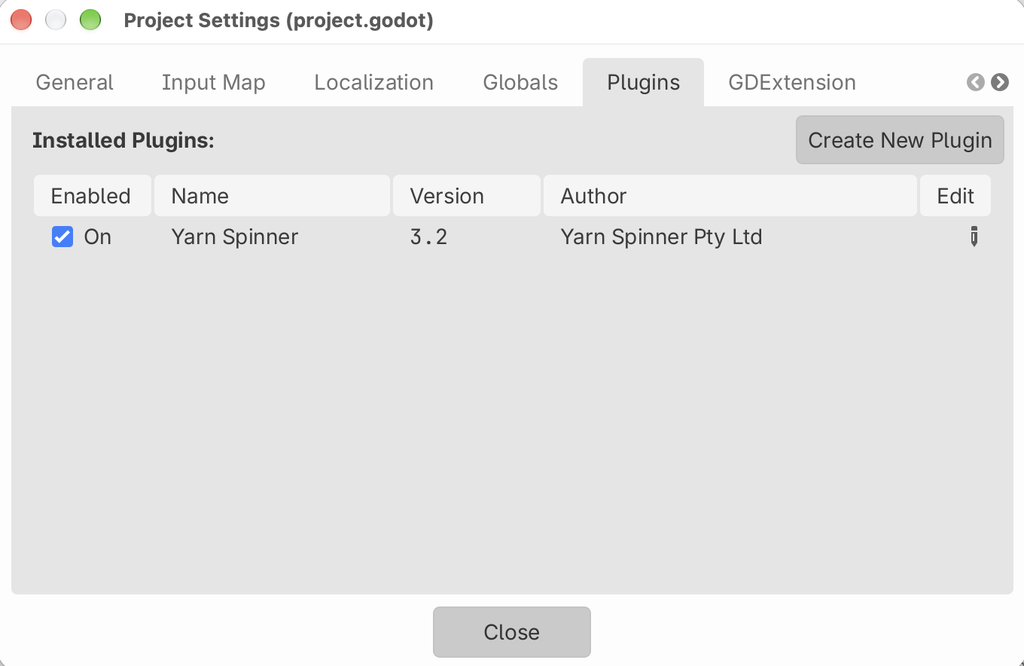
However you installed it, turn the plugin on:
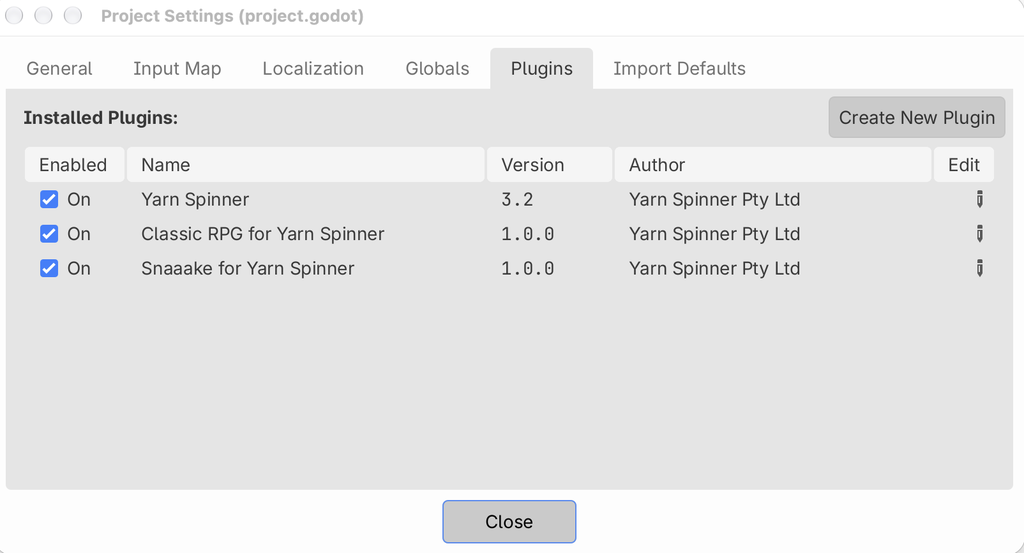
- In Godot, open , and go to the Plugins tab.
- Turn on Yarn Spinner.
If you installed Yarn Spinner+, you can turn on its add-ons here too.
Turning on Yarn Spinner adds:
- a Yarn Spinner tab at the top of the editor, next to 2D, 3D and Script, for reading and editing your Yarn Scripts. See Editor Tools.
- , for making a Yarn Project.
- importers that compile your
.yarnprojectand.yarnfiles whenever they change. - Yarn Spinner sections in the Inspector, for Yarn Projects, Dialogue Runners and Variable Storage.
- a
YarnSpinnerautoload.
The compiler
Yarn Spinner compiles your Yarn Scripts when Godot imports them. The compiler is built into the addon, in addons/yarn_spinner/native/bin, so on most computers there’s nothing else to install.
If there isn’t a built-in compiler for your computer, your Yarn Project won’t compile, and its Inspector says “No compiler available”. In that case, install ysc, the Yarn Spinner command-line tool, which needs the .NET SDK:
dotnet tool install YarnSpinner.Console --global --version 3.2.2The addon looks for ysc in the folder where dotnet tool install puts it, and on your PATH. If it’s somewhere else, set its location in , under Yarn Spinner > Compiler > Ysc Path. Turn on Advanced Settings if you don’t see it. See Project settings.
If something’s not right
If Godot reports missing files in res://addons/yarn_spinner/, or scripts fail with Could not find type "YarnDialogueRunner", the addon isn’t where the project expects it. The most common cause is copying the whole repository into addons, which puts the addon at addons/YarnSpinner-Godot-GDScript/addons/yarn_spinner. Move the inner yarn_spinner folder so it’s directly inside addons, then reload the project.
If Yarn Spinner isn’t in the Plugins list, check that plugin.cfg is at res://addons/yarn_spinner/plugin.cfg.