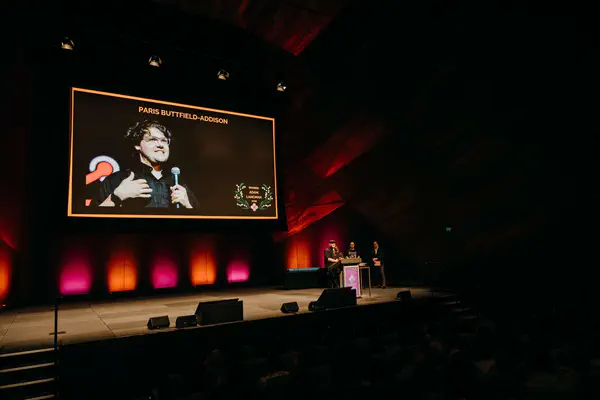
Much like June, we spent July with our heads down: we finished replicating all of our sample projects from Unity natively in Godot (GDScript), we added many new features to the VSCode extension, and we showed more of our (as yet unnamed) voice-over tool in public for the first time. Aside from a few fun things, the rest of the month went into pulling apart how Yarn Spinner understands commands and functions.
Before we get into all that, though, a quick ask…
Storefront Reviews (Pretty Please)#
We’re a small team, and the list of tools we create and maintain continues to grow—from more supported engines, more third-party integrations, more samples and tutorials, to now multiple standalone or web apps in development (Story Solver, the Playground editor, the VO tool). All of that is primarily funded by users who opt to purchase our Plus version of Yarn Spinner for Unity. It’s not a huge revenue stream, but it’s enough.
A major factor in that revenue is our presence on the Unity Asset Store and Itch.io, where we appear alongside dialogue tool alternatives new and old (and increasingly, genAI-coded), and need to stand out to prospective users as a legitimate and trusted option. For the number of people purchasing Yarn Spinner+ on these storefronts, we have extremely few ratings or reviews. We’d love to improve that.
Yarn Spinner for Unity#
Three small releases went out in July (3.2.5, 3.2.6, and 3.2.7). They’re all fixes and tidying, but there are a few changes:
LineAdvancer’s input handling moved out into separate components that it adds and removes depending on which mode you pick,- YSLS files that weren’t being written to disk now are, and
- two compile errors are gone (one when the legacy input manager isn’t available, one when the Input System isn’t enabled).
We also continued getting to the bottom of the IL2CPP build failures on Unity 6.5. If you’ve tried to make an IL2CPP build on 6.5 or later and been handed InvalidOperationException: Sequence contains no matching element, that’s this. The cause is the way we alias assemblies to stop our DLLs colliding with everyone else’s, which Unity 6.5 no longer gets along with. We have gotten it working in collaboration with a few kind users who reported the issue, and a fix has been in testing with them since 21 July. Thank you to everyone who helped us pin it down. We’ll have a fix out for this soon, along with a blog post on how we fixed it.
Commands and Functions in Unity#
A lot of the month went into commands and functions, or actions, which is what we call them internally when we mean either of the two.
The idea for this work is that there will be just one single idea of what an action is, shared by the compiler, the source generator, and the Unity plugin. So, when it’s all done it should also mean much less reflection (or none at all depending on how you write your actions) and none of it should need you to change a line of Yarn or C#. Huzzah!
The new async virtual machine has been stable internally for a while, and last month’s source generator work got compile-time action invocation more or less working. The open question was how any of that should behave inside Unity.
Calling a source-generated action turned out to be the easy bit. The generated code is just a method, and running it is just a call to that method that happens to also be a command or function in your Yarn. The dialogue runner was already being told when an action fires, so that was a small change.
Runtime actions are where it gets hard. Plenty of actions only exist at runtime, and the code that finds and invokes those is complicated in ways we can’t really avoid. Getting it to work with the new system is the slow part.
Unity’s approach until now has been IActionRegistration, a long list of registration methods for commands and functions. You register your actions with it, it looks after them, and it calls them when the time comes. Sensible enough on the surface! The trouble is that runtime registration and compile-time registration had grown quite different from one another, so there were two separate pipelines for understanding actions, each with its own behaviour and quirks. Compile-time registration barely did anything beyond noting that an action existed. There was some checking, but it was disconnected from the compilation that followed, and the results were used to write your YSLS file and otherwise ignored.
Which left four separate ideas of what an action is: the compiler’s, the source generator’s, and Unity’s, itself split into a runtime one and a compile-time one. They ought to be identical, and four sets of code meant four ways for mistakes to creep in. So now an action is an action is an action.
After that we could get back to runtime actions in Unity, which mostly meant deleting registration as a separate concept and making everything take one path. IActionRegistration hasn’t gone away yet, and whether it survives depends on a few decisions we haven’t made, but registration and invocation now run through the same code at runtime and at compile time. One flow finds the actions in your C#, and what it finds is used to tell the compiler what to expect, to write your YSLS file, to run the source generator that builds the compile-time invocation, and to set the constraints around runtime invocation.
We do still have to make it all work, of course. More updates soon!
Yarn Spinner for Godot#
Here’s the one we’re most pleased about: every single Yarn Spinner for Unity sample now has a Yarn Spinner for Godot (GDScript) equivalent. We’ve been working through this port for months, and the last of them went in at the end of July.
The voice-over sample was the second-to-last one to go, as it was one of the fiddliest: getting the dialogue running is the quick bit, but the voice-over sample has character animation, lip sync, and a whole space scene to put it all in.
Which is to say that a good chunk of the month was art rather than code! There’s new animation work, level geometry and assembly, a face rig for our sample character, and the lip-sync data that drives it. The samples browser in the Godot editor now lists everything in a sensible learning order (starting points first, then core features, presentation, voice over, and saliency) instead of alphabetically, and every sample card now has a nice little screenshot of it running.
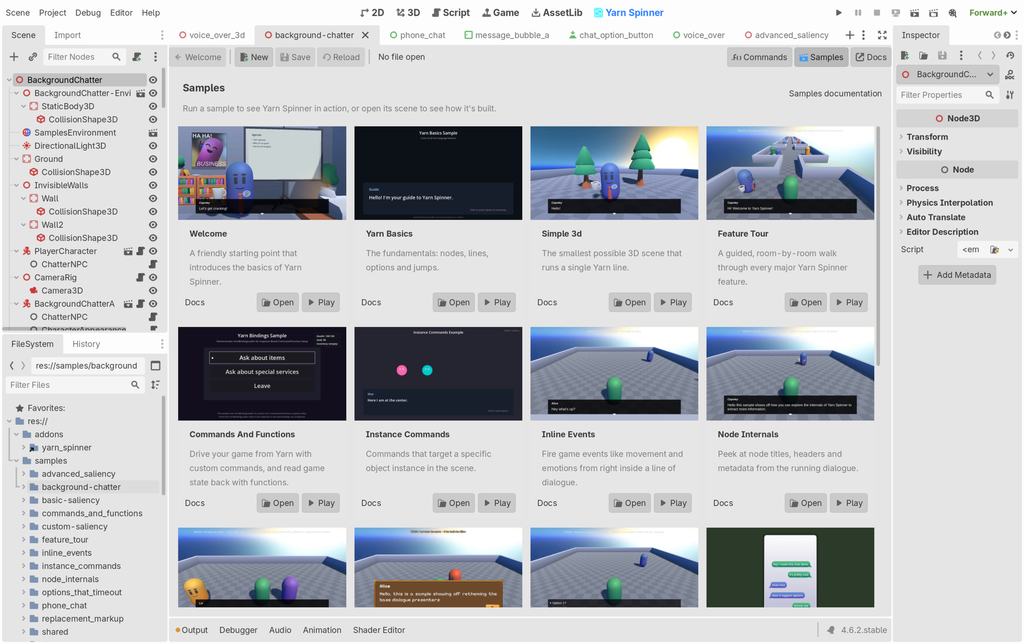
There were also two alpha releases of Yarn Spinner for Godot (GDScript): Alpha 7 carried breaking changes as we head towards beta, so if you’re on it, please read the changelog before you update, and Alpha 8 followed at the end of the month with scene-based options (the options presenter now instantiates a scene per option, the same way the Unity version instantiates its Option Item prefab), boolean flag parameters that behave the way Unity’s do, and a word wrap fix. There’s a new set of async helpers underneath it all, and the presenters have been reworked.
We’re getting close to beta. As we said in June, beta for us means no breaking API changes unless we really have to, and the work left before then is mostly documentation.
Yarn Spinner for Unreal Engine#
The Unreal samples came a long way this month. More of the character sample assets are in, along with the systems that drive them: character movement, interacting with things in the world, and a face rig. There’s also a pile of parity work with the Unity version, which is the main thing standing between Unreal and its own beta.
Yarn Spinner for Visual Studio Code#
An enormous month for the VS Code extension, almost all of it in the pre-release channel. Our release pipeline now pushes those builds to Open VSX at the same time as it pushes to the VS Code Marketplace, so if you’re on VSCodium or something else that supports VS Code extensions then you get everything when everyone else does.
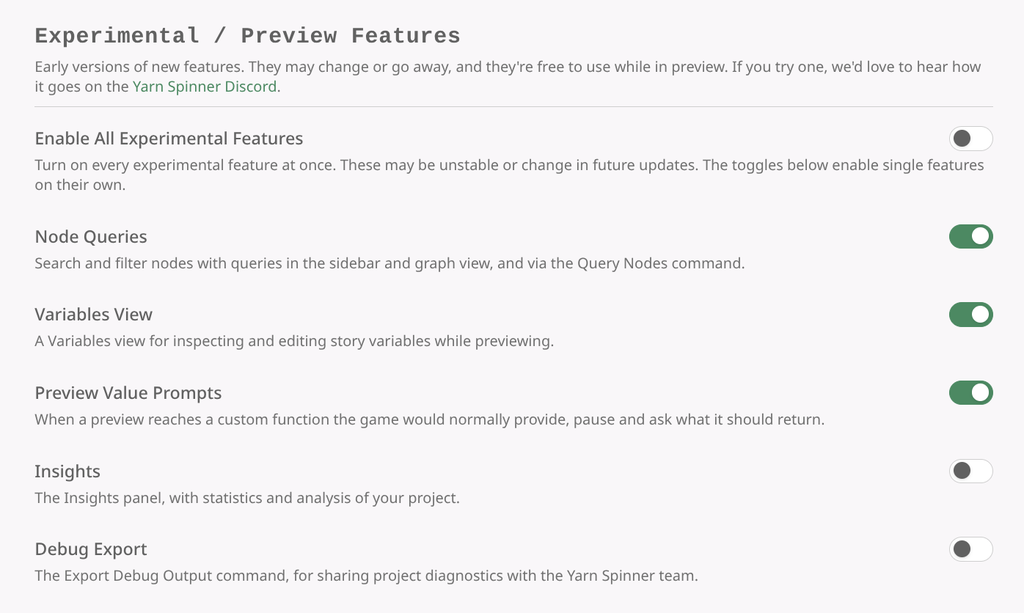
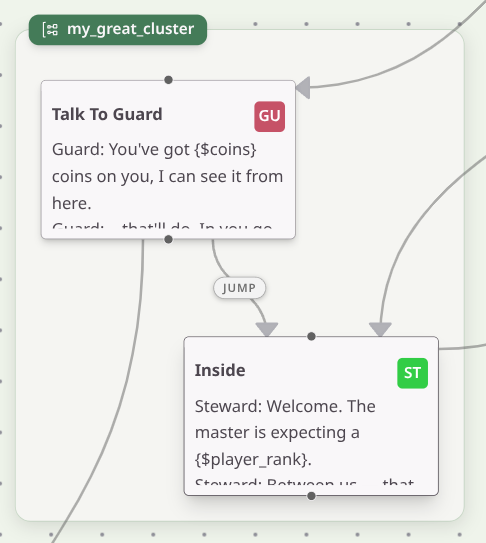
We spent a lot of the time on the graph view. There’s a collection of new toggles behind the “experimental Yarn Spinner features” settings, with one that allows connections that route around your nodes instead of straight through them, optional labels so a jump and a detour don’t look identical, much better handling of jumps that come in from or go out to other files, and a node size setting for when you want more of your project on screen at once.
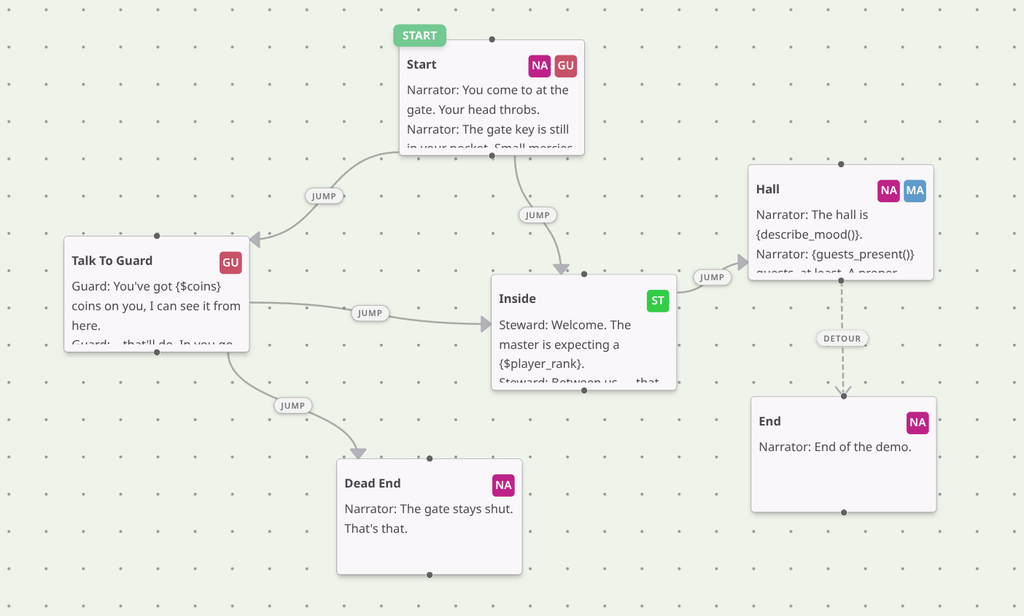
Nodes collected into a box using the cluster: header also look a lot nicer (the old group: header still works, but it’s deprecated: we needed to stop “groups”, meaning a box drawn around some nodes, being confused with “node groups”, meaning the automatic content selection system).
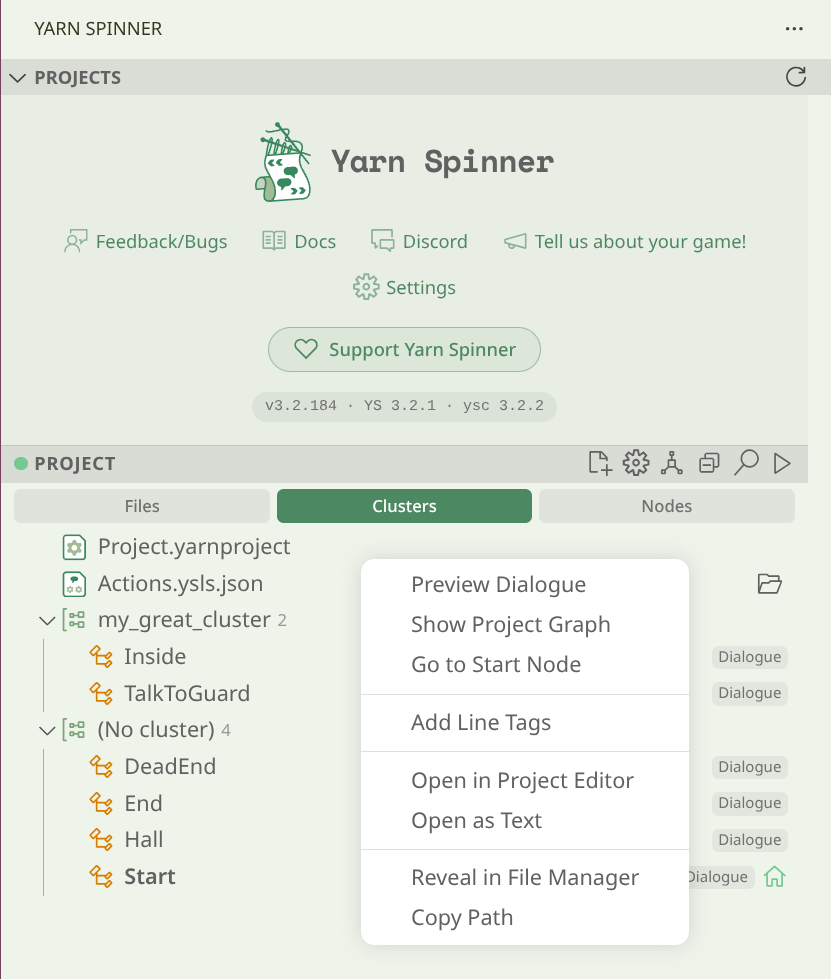
The sidebar also now shows your nodes, with right-click actions on them, subtitles on node groups, and a project view you can rearrange to suit yourself. Line tagging moved in there too. You can add line tags from the sidebar, and dim them or hide them entirely in the editor if they’re getting in the way of reading your script.
Something people have been asking about for years is now in the preview mode: it will prompt you for values when your script calls a custom function it knows about, which means you can walk through dialogue that depends on your game’s functions without your game running at all. It’s subject to change or removal, so we’ll see how it goes.
Previewing dialogue that calls a custom function, with no game running: the preview stops and asks what the function should return.
The extension has also learned which engine you’re using. It looks for the fingerprints of a Unity, Godot or Unreal project around your Yarn files, tells you what it found, and changes its advice to match. The message you get about a missing definitions file is now the one for your engine rather than a generic one. If you’re not using an engine at all, which plenty of people writing Yarn aren’t, nothing changes.
There are also new settings screens, a stack of small fixes, and a fair bit of dull work on the release pipeline so that all of this can go out more often.
We’ll be posting a blog post that covers the Yarn Spinner for Visual Studio Code extension in detail soon!
Voice-Over Tooling#
In working with dialogue management for several years now, we know well how difficult it can be to manage voice-over and dialogue-related audio alongside a large corpus of text. We’ve been internally tooling around with a VO tool for a while now, but it’s become very clear there is demand for such a thing among our users too. So in July, we finally showed it off.
It turns your Yarn Spinner project into a script your actors can read from, with delivery notes attached to lines so you get the take you’re after. During a recording session you tell it whose lines you’re delivering and it highlights those, while leaving everything else visible so your actor still has the context. Afterwards you drop the recording back in, it finds the regions of spoken audio, you link those regions to the written lines they belong to, adjust any trimmings or edits you want, and it exports the lot with the filenames your game expects.
The tool still doesn’t have a name. Our internal one is “Jon and Paris got so mad at cutting up hundreds of lines of audio for a client game they had to make an app about it”, which is accurate but does not fit on a button. Suggestions welcome.
Story Solver#
Story Solver this month was mostly continuing on account management and team management: signing in, who owns a project, and getting other people onto it with you. Not much to look at next to the quest graph editor we showed last month, but a tool that teams are meant to share can’t ship without all the plumbing, alas. We’re on track for our planned release towards the end of the year.
Business Business#
It’s been another rough month for games industry layoffs, and it’s heartbreaking to see so many talented creative and technical minds be so devalued. Following the lead from the great Kenney, we are hoping to do a small part to help by giving away Yarn Spinner+ products for free to professionals caught up in these mass layoffs. Whether you want to use it to polish your portfolio, build new skills, or just vent via the medium of IF, there’s no questions asked. Visit lab.to/YSClaim to claim.
One nice thing that happened this month is the Australian outlet ScreenHub ran a lovely piece on our island’s games industry. We also got to spend some time in Queenstown on Tasmania’s west coast, running a workshop with the local schoolkids on storytelling, data analysis and space science.
Other Fun Stuff#
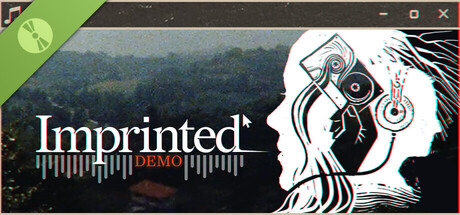
Some great Yarn Spinner game releases this month, included the long-awaited Scarlet Deer Inn—a 2D adventure made with real embroidered characters and music from traditional instruments—and a demo for Imprinted in the fakeOS genre that we so adore.

Loads of Yarn Spinner games also featured in the Nonbinary Coded Games showcase on Steam to mark International Non-Binary People’s Day on July 14th, and the student talent coming out of the USC games degree was made evident again with the release of Sisyphus’s Worst Day (again).
Summary#
- Shipped Yarn Spinner for Unity 3.2.5, 3.2.6 and 3.2.7, and almost got to the bottom of the IL2CPP build failures on Unity 6.5, with a fix in testing. Known issues like this one are now tracked on our help page.
- Rebuilt how actions work, so that the compiler, the source generator and Unity all share one definition of a command or function, with one path for finding and invoking them at runtime and at compile time. Still in progress, and should mean far less reflection when it’s done.
- Godot (GDScript): the sample port is finished, with every Unity sample now available in Godot, plus a lot of animation, lip-sync and level art work. Alphas 7 and 8 shipped, beta is so very close.
- Unreal: more character sample assets, movement, interaction and a face rig, plus parity work ahead of beta.
- VS Code: an enormous release in the pre-release channel, with a new graph view, node clustering, a much better sidebar, line tagging, variable inspection during preview, custom function prompts, engine detection, and pre-releases going out to Open VSX automatically.
- Showed off our voice-over tool, which handles scripts, recording sessions, and slicing recordings back into per-line audio files. It still needs a name.
- Story Solver: account and team management.
That’s July. See you next month!
Header image: Queenstown, on the west coast of lutruwita/Tasmania, on a wet winter morning. Taken by Yarn Spinner's Dr Jon Manning on a drone.
Unless otherwise noted, the content of this post is licensed under Creative Commons Attribution-NonCommercial-ShareAlike 4.0 International (CC BY-NC-SA 4.0). Logos, screenshots, and artwork shown in this post remain the property of their respective owners and are not covered by this license. The Yarn Spinner logo and branding imagery are also not covered by this license.